

We provide ie2p Mobile InterPay online (apkid: com.mobileinterpay) in order to run this application in our online Android emulator.
Description:
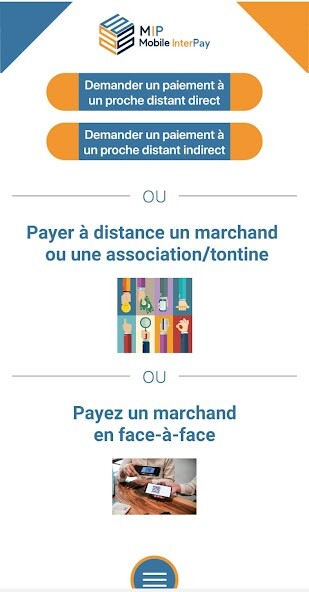
Run this app named ie2p Mobile InterPay using MyAndroid.
You can do it using our Android online emulator.
With Mobile InterPay (MIP), diaspora merchant payment by bank card has never been easier - Using your mobile to pay remotely and face-to-face by QR Code is a major innovation in the market of diaspora merchant payment.
After downloading the Mobile InterPay (MIP) application, the user can install,
- either the "MIP Customer" client version to pay by credit card or by wallet,
- either the merchant version, "MIP Merchant" to transform his smartphone into a mobile payment terminal and accept payments by bank card and by wallet with or without an e-commerce site.
It must enter MIP Merchant, its product / service catalog in.
To pay for a product in a merchant's catalog:
1- Make your choice:
- Direct payment (the merchant's account is credited immediately)
- Indirect payment (the merchant's account is credited after delivery)
2 - Choose direct or indirect payment.
3 - Choose the country from the list.
4 - Select the merchant from the list.
5 - Select the product or service from the merchant's catalog.
6 - Enter the parameters of your card, then validate.
7 - The payment is validated.
8 - If you have chosen "indirect payment", the merchant's account is credited after confirmation of delivery.
If not, the merchant's account is credited immediately.
Below, some examples of use:
1 - From abroad, the diaspora can use their bank card to remotely pay for a product offered by a merchant, after validation of the transaction, the merchant's account is effectively credited after removal of the product by a third party locally.
2 - A member of the diaspora, from abroad, wishes to carry out work in a distant country, with a guarantee of completion.
It is aimed at a service provider who also wishes to have the guarantee of payment:
a - The service provider enters the amount of his service on his MIP app
b - The diaspora member connects to his MIP app, selects the provider's bill, enters the parameters of his bank card, then pays the bill.
c - The service provider receives the payment confirmation, but his account is not credited.
d - The service provider commits the work, after having received the guarantee to be paid.
e - A relative of the member of the diaspora goes to the work site and validates the proper execution of the work.
f - The service provider's account is immediately credited.
After each payment by card, an invoice is sent by email to the payer's customer area, a payment receipt is sent by email to the merchant, a monthly payment summary is automatically sent to the customer by email once a month and saved in its customer area.
With regard to face-to-face payments by QR Code, merchants who have installed the Mobile InterPay (MIP) application have the option of printing receipts directly on a thermal printer connected by Bluetooth to the MIP application.
IE2P SAS, is a company incorporated under French law, publisher of the Mobile InterPay (MIP) application; it holds a Payment Service Provider Agent license under number 95584, assigned by the ACPR (Prudential Control and Resolution Authority) of the Banque de France.
After downloading the Mobile InterPay (MIP) application, the user can install,
- either the "MIP Customer" client version to pay by credit card or by wallet,
- either the merchant version, "MIP Merchant" to transform his smartphone into a mobile payment terminal and accept payments by bank card and by wallet with or without an e-commerce site.
It must enter MIP Merchant, its product / service catalog in.
To pay for a product in a merchant's catalog:
1- Make your choice:
- Direct payment (the merchant's account is credited immediately)
- Indirect payment (the merchant's account is credited after delivery)
2 - Choose direct or indirect payment.
3 - Choose the country from the list.
4 - Select the merchant from the list.
5 - Select the product or service from the merchant's catalog.
6 - Enter the parameters of your card, then validate.
7 - The payment is validated.
8 - If you have chosen "indirect payment", the merchant's account is credited after confirmation of delivery.
If not, the merchant's account is credited immediately.
Below, some examples of use:
1 - From abroad, the diaspora can use their bank card to remotely pay for a product offered by a merchant, after validation of the transaction, the merchant's account is effectively credited after removal of the product by a third party locally.
2 - A member of the diaspora, from abroad, wishes to carry out work in a distant country, with a guarantee of completion.
It is aimed at a service provider who also wishes to have the guarantee of payment:
a - The service provider enters the amount of his service on his MIP app
b - The diaspora member connects to his MIP app, selects the provider's bill, enters the parameters of his bank card, then pays the bill.
c - The service provider receives the payment confirmation, but his account is not credited.
d - The service provider commits the work, after having received the guarantee to be paid.
e - A relative of the member of the diaspora goes to the work site and validates the proper execution of the work.
f - The service provider's account is immediately credited.
After each payment by card, an invoice is sent by email to the payer's customer area, a payment receipt is sent by email to the merchant, a monthly payment summary is automatically sent to the customer by email once a month and saved in its customer area.
With regard to face-to-face payments by QR Code, merchants who have installed the Mobile InterPay (MIP) application have the option of printing receipts directly on a thermal printer connected by Bluetooth to the MIP application.
IE2P SAS, is a company incorporated under French law, publisher of the Mobile InterPay (MIP) application; it holds a Payment Service Provider Agent license under number 95584, assigned by the ACPR (Prudential Control and Resolution Authority) of the Banque de France.
MyAndroid is not a downloader online for ie2p Mobile InterPay. It only allows to test online ie2p Mobile InterPay with apkid com.mobileinterpay. MyAndroid provides the official Google Play Store to run ie2p Mobile InterPay online.
