
We provide Myo Dialer online (apkid: com.lloydtorres.myodialer) in order to run this application in our online Android emulator.
Description:
Run this app named Myo Dialer using MyAndroid.
You can do it using our Android online emulator.
Myo Dialer was built from the idea that mobile devices make more sense with your Myo armband.
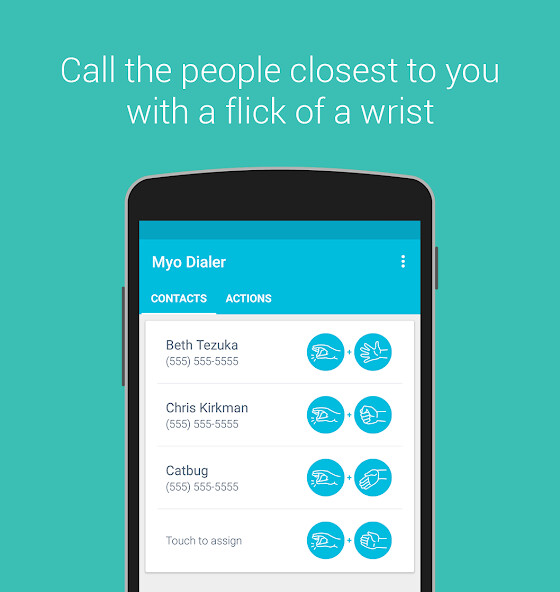
Simply assign a contact with a gesture combination and you will be able to make calls with a flick of a wrist.
Theres no need to even take your phone out of your pocket!
Features
Send calls with a flick of a wrist without taking out your phone
Assign up to four favorite contacts to specific gestures
Ring your Myo armband on incoming calls
Accept, end or reject calls and toggle the speakerphone/microphone with gestures
Automatically enable the speakerphone on calls when Myo Dialer is active
Requirements
Myo armband with 1.1.4 firmware or greater: https: //www.thalmic.com/en/myo/
Phone with Bluetooth Smart (BLE) support
Myo Dialer cannot be used to call emergency services such as 911 due to restrictions in Android.
For your safety, please do not rely on this app to call emergency services.
Myo Dialer can send data to Thalmic Labs when it is connected to a Myo armband.
For their privacy policy, see: https: //thalmic.com/privacy/
Permissions
This section explains the permissions required by the app.
Directly call phone numbers/read phone status and identity
These are required to make phone calls and to detect incoming calls.
Read your contacts
This is required to get contact information for selected contacts.
Disable your screen lock/prevent phone from sleeping
These are required to answer incoming phone calls, when your phone may be locked or asleep.
The app will not remove your lock screen password or keep your phone constantly awake.
Full network access
This is required by the Myo and the crash reports service.
You may disable these in the app settings.
Access Bluetooth settings/pair with Bluetooth devices
These are needed to pair with the Myo armband.
Change your audio settings
This is needed to toggle the speakerphone and microphone during calls.
Simply assign a contact with a gesture combination and you will be able to make calls with a flick of a wrist.
Theres no need to even take your phone out of your pocket!
Features
Send calls with a flick of a wrist without taking out your phone
Assign up to four favorite contacts to specific gestures
Ring your Myo armband on incoming calls
Accept, end or reject calls and toggle the speakerphone/microphone with gestures
Automatically enable the speakerphone on calls when Myo Dialer is active
Requirements
Myo armband with 1.1.4 firmware or greater: https: //www.thalmic.com/en/myo/
Phone with Bluetooth Smart (BLE) support
Myo Dialer cannot be used to call emergency services such as 911 due to restrictions in Android.
For your safety, please do not rely on this app to call emergency services.
Myo Dialer can send data to Thalmic Labs when it is connected to a Myo armband.
For their privacy policy, see: https: //thalmic.com/privacy/
Permissions
This section explains the permissions required by the app.
Directly call phone numbers/read phone status and identity
These are required to make phone calls and to detect incoming calls.
Read your contacts
This is required to get contact information for selected contacts.
Disable your screen lock/prevent phone from sleeping
These are required to answer incoming phone calls, when your phone may be locked or asleep.
The app will not remove your lock screen password or keep your phone constantly awake.
Full network access
This is required by the Myo and the crash reports service.
You may disable these in the app settings.
Access Bluetooth settings/pair with Bluetooth devices
These are needed to pair with the Myo armband.
Change your audio settings
This is needed to toggle the speakerphone and microphone during calls.
MyAndroid is not a downloader online for Myo Dialer. It only allows to test online Myo Dialer with apkid com.lloydtorres.myodialer. MyAndroid provides the official Google Play Store to run Myo Dialer online.
