
We provide LFX Tool- GFX Tool, QuickScope online (apkid: com.kslfxctool) in order to run this application in our online Android emulator.
Description:
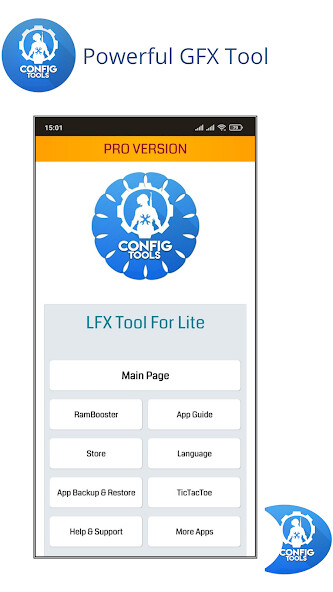
Run this app named LFX Tool- GFX Tool, QuickScope using MyAndroid.
You can do it using our Android online emulator.
Improve Your Gaming Experience Like Never Before!
LFX Tool, a Completely Free, Powerful GFX Tool & Booster app is here for you! Fully Customize your game graphics from Potato to Equivalent to HDR, Improve your FPS to maximum, Fix Lags of Low-end Devices, Unlock Super Brightness, Unlock Quick Scope, FPP, Up to Gyro 400 Sensitivity, Custom Quick Chat & more!
LFX Tool is also a powerful App Backup & Uninstall controller app.
You can get apk file of any android app installed on your device, uninstall them.
You can also Monitor required permissions by any app.
LFX Tool can also monitor Storage & RAM status.
Additionally, you can play TicTacToe inside it.
Features of App:
Basic Features:
a)Change Game Resolution from Very Low to Very High.
b)Enables Quick Scope mode.
c)Enables FPP mode.
d)Enables Gyro 300/400 Sensitivity.
e)Enables Custom Quick Chat.
Local Backup Feature: Fully Backup Your Controls & Sensitivity, apply anytime or Share with your friends.
Cloud Backup Feature: Backup Your Controls & Sensitivity over Cloud & youll never lose it again!
RAM Booster Feature: Track your Storage, RAM & Network Status!
App Backup & Restore Feature: Track Status of all Installed apps in the devices, Required Permissions & Backup the original .apk file as per your need!
Support of Local Files Feature: Apply any Config File with the app.
Play TicTacToe Game: You can play the most popular TicTacToe game inside the app!
How to Use App:
App is very simple & easy to use.
Complete in app guide is provided with the app and you can easily use it.
Complete app is totally free to use, coin system has been removed on version 3.2.1
Disclaimer:
LFX Tool is completely free to use, safe & risk free of ban.
All features are available without any special access & there are ads placed by Developer.
However, you need to connect your google account with LFX Tool to access Cloud Backup Feature.
LFX Tool pro version will give extra access to some features & ads free experience.
Follow Us:
You Can Follow us at:
Facebook: https: //www.facebook.com/AK-Apps-103161535133917
Telegram: https: //t.me/lag_fix_config_tool
Contact Us direct at: [email protected]
LFX Tool, a Completely Free, Powerful GFX Tool & Booster app is here for you! Fully Customize your game graphics from Potato to Equivalent to HDR, Improve your FPS to maximum, Fix Lags of Low-end Devices, Unlock Super Brightness, Unlock Quick Scope, FPP, Up to Gyro 400 Sensitivity, Custom Quick Chat & more!
LFX Tool is also a powerful App Backup & Uninstall controller app.
You can get apk file of any android app installed on your device, uninstall them.
You can also Monitor required permissions by any app.
LFX Tool can also monitor Storage & RAM status.
Additionally, you can play TicTacToe inside it.
Features of App:
Basic Features:
a)Change Game Resolution from Very Low to Very High.
b)Enables Quick Scope mode.
c)Enables FPP mode.
d)Enables Gyro 300/400 Sensitivity.
e)Enables Custom Quick Chat.
Local Backup Feature: Fully Backup Your Controls & Sensitivity, apply anytime or Share with your friends.
Cloud Backup Feature: Backup Your Controls & Sensitivity over Cloud & youll never lose it again!
RAM Booster Feature: Track your Storage, RAM & Network Status!
App Backup & Restore Feature: Track Status of all Installed apps in the devices, Required Permissions & Backup the original .apk file as per your need!
Support of Local Files Feature: Apply any Config File with the app.
Play TicTacToe Game: You can play the most popular TicTacToe game inside the app!
How to Use App:
App is very simple & easy to use.
Complete in app guide is provided with the app and you can easily use it.
Complete app is totally free to use, coin system has been removed on version 3.2.1
Disclaimer:
LFX Tool is completely free to use, safe & risk free of ban.
All features are available without any special access & there are ads placed by Developer.
However, you need to connect your google account with LFX Tool to access Cloud Backup Feature.
LFX Tool pro version will give extra access to some features & ads free experience.
Follow Us:
You Can Follow us at:
Facebook: https: //www.facebook.com/AK-Apps-103161535133917
Telegram: https: //t.me/lag_fix_config_tool
Contact Us direct at: [email protected]
MyAndroid is not a downloader online for LFX Tool- GFX Tool, QuickScope. It only allows to test online LFX Tool- GFX Tool, QuickScope with apkid com.kslfxctool. MyAndroid provides the official Google Play Store to run LFX Tool- GFX Tool, QuickScope online.
