

We provide Sbracelet online (apkid: com.ks.sbracelet1) in order to run this application in our online Android emulator.
Description:
Run this app named Sbracelet using MyAndroid.
You can do it using our Android online emulator.
This app is connected to smart bracelet via Bluetooth 4.0.
The bracelet can record the data and this app can sync the data to the phone/tablet.
The functions of this app are as follow:
First of all, connect the app to bracelet by searching Bluetooth.
After connected, the app can sync all the data recorded by the bracelet to phone/tablet.
Second, Calculate Steps.
The bracelet can measure how many steps you walk when wearing it.
Then the app can reflect the data on the screen so you can know how much calories you have consumed and how much you have done according to your setting goal.
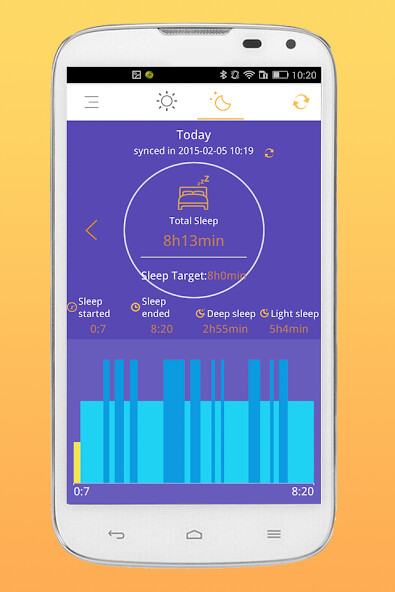
Third, Monitor Sleeping.
By wearing the bracelet, it monitors the status when you sleep at night.
The next day when you sync the sleep data on the phone/tablet, the app can tell you how many hours you sleep deeply and how many hours you sleep lightly.
Fourth, Alarm Clock.
Select a time when you want the bracelet to vibrate on the app, the bracelet will vibrate at the setting time to remind you of something important.
Fifth, Call Reminder.
Turn on the Call Reminder on the app.
When theres is a call coming, the bracelet will vibrate to inform you that someone is calling you.
Sixth, Settings.
In Settings Function, you can edit your own profile.
Also you can set your health target.
Besides, you can update the device to the latest version.
Moreover, you can change the app language from Chinese to English.
The bracelet can record the data and this app can sync the data to the phone/tablet.
The functions of this app are as follow:
First of all, connect the app to bracelet by searching Bluetooth.
After connected, the app can sync all the data recorded by the bracelet to phone/tablet.
Second, Calculate Steps.
The bracelet can measure how many steps you walk when wearing it.
Then the app can reflect the data on the screen so you can know how much calories you have consumed and how much you have done according to your setting goal.
Third, Monitor Sleeping.
By wearing the bracelet, it monitors the status when you sleep at night.
The next day when you sync the sleep data on the phone/tablet, the app can tell you how many hours you sleep deeply and how many hours you sleep lightly.
Fourth, Alarm Clock.
Select a time when you want the bracelet to vibrate on the app, the bracelet will vibrate at the setting time to remind you of something important.
Fifth, Call Reminder.
Turn on the Call Reminder on the app.
When theres is a call coming, the bracelet will vibrate to inform you that someone is calling you.
Sixth, Settings.
In Settings Function, you can edit your own profile.
Also you can set your health target.
Besides, you can update the device to the latest version.
Moreover, you can change the app language from Chinese to English.
MyAndroid is not a downloader online for Sbracelet. It only allows to test online Sbracelet with apkid com.ks.sbracelet1. MyAndroid provides the official Google Play Store to run Sbracelet online.
