

We provide Click to India online (apkid: com.ionicframework.clicktoindia) in order to run this application in our online Android emulator.
Description:
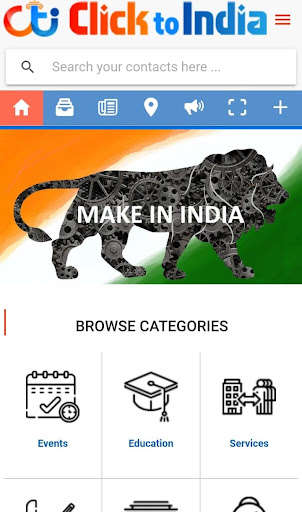
Run this app named Click to India using MyAndroid.
You can do it using our Android online emulator.
Finding potential customers is a demanding process for small businesses.
Gone are the days of paying for a local website advertisement and forgetting about it.
Citation sites and online business directories have replaced those golden tomes.
The more online exposure your business has, the more advantage it can gain.
Local marketing campaigns are now using these directories as a strategy for boosting brand.
Listing businesses in online directories increases your companys exposure.
Your presence within these directories an mean a larger audience, more site traffic and potential customers.
To save you time, I have provided links directly to the submission or sign-up page where applicable.
Set a aside a few hours this week and submit your local business to these free online directories:
HOW TO PLACE A BUSINESS LISTING IN THE DIRECTORY ?
NOTE: You will be posting a complete web page listing for our users to view your information, a link to your web site, map, photos, discounts and specials if you have them.
Please be sure when you create your page, you provide the user with as much information about your product, business or service as possible.
Be sure to include a link to your web site as well as complete address and any contact information so users can purchase or get more information.
Once received, our staff will review and activate all listings and will be on display for one year or until you remove it.
1- Register: There is no charge.
Once you register, you will receive an email to verify your email and create your password to access your control area.
http: //www.clicktoindia.com/customer/
2- Log In: After you register and verified and are logged in, click the Add Your Business Listing Here or at the sidebar of the page
WHEN CREATING YOUR LISTING TIPS
3- Select your state, district, category and subcategory: Please select the proper state and category in the drop down menu.
4- Enter your business, product or service details: Please enter as many details as you like.
5- Upload your logo or photo: You are able to upload as many as photo you want that best represents your service and can include text overlay.
6- Confirm your photo is correct: Then select list your business and you will see a listing submitted message.
Advertising on clicktoindia.com:
If you would like to display a banner, be featured or work out additional promotions, please contact our office to discuss any advertising space we have available.
Our staff can help you design a banner or you can provide one.
NOTE: Advertising space on the web site is limited.
Please check with us for availability.
WE ARE PROVIDING THE BELOW SERVICES ALSO.
1)\tDigital Marketing
2)\tWebsite Design and Development
3)\tMobile App Development
4)\tSoftware Development
5)\tComputer and Accessories Sales and Services
6)\tBusiness Consulting
7)\tJob and Career Consulting
8)\tHub for Manufactures and Distributors
Gone are the days of paying for a local website advertisement and forgetting about it.
Citation sites and online business directories have replaced those golden tomes.
The more online exposure your business has, the more advantage it can gain.
Local marketing campaigns are now using these directories as a strategy for boosting brand.
Listing businesses in online directories increases your companys exposure.
Your presence within these directories an mean a larger audience, more site traffic and potential customers.
To save you time, I have provided links directly to the submission or sign-up page where applicable.
Set a aside a few hours this week and submit your local business to these free online directories:
HOW TO PLACE A BUSINESS LISTING IN THE DIRECTORY ?
NOTE: You will be posting a complete web page listing for our users to view your information, a link to your web site, map, photos, discounts and specials if you have them.
Please be sure when you create your page, you provide the user with as much information about your product, business or service as possible.
Be sure to include a link to your web site as well as complete address and any contact information so users can purchase or get more information.
Once received, our staff will review and activate all listings and will be on display for one year or until you remove it.
1- Register: There is no charge.
Once you register, you will receive an email to verify your email and create your password to access your control area.
http: //www.clicktoindia.com/customer/
2- Log In: After you register and verified and are logged in, click the Add Your Business Listing Here or at the sidebar of the page
WHEN CREATING YOUR LISTING TIPS
3- Select your state, district, category and subcategory: Please select the proper state and category in the drop down menu.
4- Enter your business, product or service details: Please enter as many details as you like.
5- Upload your logo or photo: You are able to upload as many as photo you want that best represents your service and can include text overlay.
6- Confirm your photo is correct: Then select list your business and you will see a listing submitted message.
Advertising on clicktoindia.com:
If you would like to display a banner, be featured or work out additional promotions, please contact our office to discuss any advertising space we have available.
Our staff can help you design a banner or you can provide one.
NOTE: Advertising space on the web site is limited.
Please check with us for availability.
WE ARE PROVIDING THE BELOW SERVICES ALSO.
1)\tDigital Marketing
2)\tWebsite Design and Development
3)\tMobile App Development
4)\tSoftware Development
5)\tComputer and Accessories Sales and Services
6)\tBusiness Consulting
7)\tJob and Career Consulting
8)\tHub for Manufactures and Distributors
MyAndroid is not a downloader online for Click to India. It only allows to test online Click to India with apkid com.ionicframework.clicktoindia. MyAndroid provides the official Google Play Store to run Click to India online.
