

We provide Instek Digital CCMobile online (apkid: com.instekdigital.ccmobile) in order to run this application in our online Android emulator.
Description:
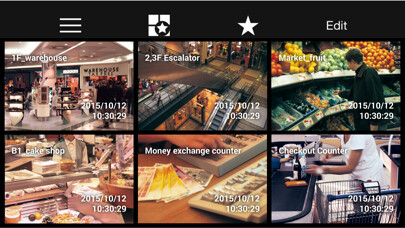
Run this app named Instek Digital CCMobile using MyAndroid.
You can do it using our Android online emulator.
CC Mobile App allows you to view surveillance videos from Instek Digital NVR from anywhere and 24/7 from an Android smartphone or tablet.
CC Mobile App is a must for security managers who are on the move and require to respond to incident immediately.
Key Features:
Real-Time Video Streaming: view up to six live Video streams on the go
Instant Playback: instantly view recorded surveillance videos with configured timeslot
Control PTZ Cameras: control Pan/Tilt/Zoom cameras with your phone
Download and Export Video Data: download Video and export it
Automatically NVR Detection: with just one button click list all the NVRs in the network
Create and Save Personal Patterns: create and store personal favorite patterns and view them with just a click
One Click Snapshot for Evidence: easily take snapshots for evidence
Layout 1x1, 2x2 and 2x3/3x2: view up to six cameras simultaneously
Support Android 4.1 and up: view Video surveillance from any smartphone and/or tablet with Android 4.1 and up
Various Network Support: support Wi-Fi, 3G and 4G network
View in Landscape Mode: rotate the device to view surveillance videos in landscape mode
Full Screen Mode: view any Video in full screen by clicking two times on the player
Requirements:
Works only with Instek Digital NVR version 5.3.3-3820 and later
Network Setup:
Using internal network to connect to the NVR
To get connected to Instek Digitals NVR select Menu (top-left button) and Device Configuration.
Click the add button type the NVR Name, IP-address/Domain Name, Command Port(59999), RTSP Port(554), User Name and Password and click the confirm button.
Using 3G or 4G to connect to the NVR
When you are using 3G or 4G make sure to configure the router.
Open the Command port(59999) and RTSP port(554) in order for the smartphone and/or tablet to communicate with the NVR.
For example,
NVR1 command port : 192.168.0.100: 59999 / router ( 168.95.1.250: n)
Type n in CC Mobile as command port
NVR1 command port : 192.168.0.100: 554 / router ( 168.95.1.250: n+1)
Type n+1 in CC Mobile as RTSP port
Type router IP( as above example, the public IP will be 168.95.1.250 )
Then you can use 3G or 4G to link to the router's address, the preset port will be transfer into the port in internal private LAN.
For more information please visit www.instekdigital.com
Instek Digital is the Video surveillance business unit of Good Will Instrument Co., Ltd.
and focus on the development of high quality digital surveillance solutions.
The company inherited over 20-years of surveillance experience.
Instek Digital has the luxury of a strong financial background supported by Good Will Instrument Co., Ltd.
has over 40-years of electronics R&D and manufacturing experience.
And Good Will Instrument Co., Ltd.
is also listed on the Taiwanese Stock Exchange.
CC Mobile App is a must for security managers who are on the move and require to respond to incident immediately.
Key Features:
Real-Time Video Streaming: view up to six live Video streams on the go
Instant Playback: instantly view recorded surveillance videos with configured timeslot
Control PTZ Cameras: control Pan/Tilt/Zoom cameras with your phone
Download and Export Video Data: download Video and export it
Automatically NVR Detection: with just one button click list all the NVRs in the network
Create and Save Personal Patterns: create and store personal favorite patterns and view them with just a click
One Click Snapshot for Evidence: easily take snapshots for evidence
Layout 1x1, 2x2 and 2x3/3x2: view up to six cameras simultaneously
Support Android 4.1 and up: view Video surveillance from any smartphone and/or tablet with Android 4.1 and up
Various Network Support: support Wi-Fi, 3G and 4G network
View in Landscape Mode: rotate the device to view surveillance videos in landscape mode
Full Screen Mode: view any Video in full screen by clicking two times on the player
Requirements:
Works only with Instek Digital NVR version 5.3.3-3820 and later
Network Setup:
Using internal network to connect to the NVR
To get connected to Instek Digitals NVR select Menu (top-left button) and Device Configuration.
Click the add button type the NVR Name, IP-address/Domain Name, Command Port(59999), RTSP Port(554), User Name and Password and click the confirm button.
Using 3G or 4G to connect to the NVR
When you are using 3G or 4G make sure to configure the router.
Open the Command port(59999) and RTSP port(554) in order for the smartphone and/or tablet to communicate with the NVR.
For example,
NVR1 command port : 192.168.0.100: 59999 / router ( 168.95.1.250: n)
Type n in CC Mobile as command port
NVR1 command port : 192.168.0.100: 554 / router ( 168.95.1.250: n+1)
Type n+1 in CC Mobile as RTSP port
Type router IP( as above example, the public IP will be 168.95.1.250 )
Then you can use 3G or 4G to link to the router's address, the preset port will be transfer into the port in internal private LAN.
For more information please visit www.instekdigital.com
Instek Digital is the Video surveillance business unit of Good Will Instrument Co., Ltd.
and focus on the development of high quality digital surveillance solutions.
The company inherited over 20-years of surveillance experience.
Instek Digital has the luxury of a strong financial background supported by Good Will Instrument Co., Ltd.
has over 40-years of electronics R&D and manufacturing experience.
And Good Will Instrument Co., Ltd.
is also listed on the Taiwanese Stock Exchange.
MyAndroid is not a downloader online for Instek Digital CCMobile. It only allows to test online Instek Digital CCMobile with apkid com.instekdigital.ccmobile. MyAndroid provides the official Google Play Store to run Instek Digital CCMobile online.
