

We provide MobiLeave online (apkid: com.htpl.mobileave.balmer) in order to run this application in our online Android emulator.
Description:
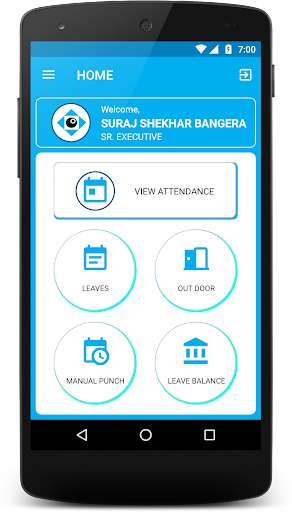
Run this app named MobiLeave using MyAndroid.
You can do it using our Android online emulator.
Features of the MobiLeave:
\tEmployee can see the attendance details.\t
\t- Attendance punch of InTime/OutTime.
\t- Total work hours.
\t- Status of the attendance (Present,Absent,Week off)
\t------- Employee -------
1.
Employee can apply for Leave, Out Door and Manual Punch.
2.
Employee can apply for cancellation of approved Leaves, Out Doors and Manual Punches.
3.
Employee can use filter feature to get details for the specific entries of Leave, Out door or Manual Punch.
\tFilter of Leave:
\t- Employee can check entries between specified date range.
\t- Employee can check entries of specific leave types.
(i.e.
PL,CL,SL)
\t- Can get status wise Entries.
(i.e.
Pending,Approved,Rejected,etc.)
\t
\tFilter of Out Door:
\t- Employee can check entries between specified date range.
\t- Can get details of Date wise and Time wise entries.
\t- Can get status wise Entries.
(i.e.
Pending,Approved,Rejected,etc.)
\t
\tFilter of Manual Punch:
\t- Employee can check entries between specified date range.
\t- Can get details of Punch: InTime/OutTime.
\t- Can get status wise Entries.
(i.e.
Pending,Approved,Rejected,etc.)
\t
\t------- Reporting Person / Approver -------
1.
Approver can approve applications of Leave, Out Door and Manual Punch.
2.
Approver can approve cancellation applications of the approved Leaves, Out Doors and Manual Punches.
3.
Approver can use filter feature to get details for the specific entries of Leave, Out door or Manual Punch.
\tFilter of Leave:
\t- Employee can check leave entries of his reporting employees.
\t- Employee can check entries between specified date range.
\t- Employee can check entries of specific leave types.
(i.e.
PL,CL,SL)
\t- Can get status wise Entries.
(i.e.
Pending,Approved,Rejected,etc.)
\t
\tFilter of Out Door/Field Work:
\t- Employee can check out door entries of his reporting employees.
\t- Employee can check entries between specified date range.
\t- Can get details of Date wise and Time wise entries.
\t- Can get status wise Entries.
(i.e.
Pending,Approved,Rejected,etc.)
\t
\tFilter of Manual Punch:
\t- Employee can check manual punch entries of his reporting employees.
\t- Employee can check entries between specified date range.
\t- Can get details of Punch: InTime/OutTime.
\t- Can get status wise Entries.
(i.e.
Pending,Approved,Rejected,etc.)
\tEmployee can see the attendance details.\t
\t- Attendance punch of InTime/OutTime.
\t- Total work hours.
\t- Status of the attendance (Present,Absent,Week off)
\t------- Employee -------
1.
Employee can apply for Leave, Out Door and Manual Punch.
2.
Employee can apply for cancellation of approved Leaves, Out Doors and Manual Punches.
3.
Employee can use filter feature to get details for the specific entries of Leave, Out door or Manual Punch.
\tFilter of Leave:
\t- Employee can check entries between specified date range.
\t- Employee can check entries of specific leave types.
(i.e.
PL,CL,SL)
\t- Can get status wise Entries.
(i.e.
Pending,Approved,Rejected,etc.)
\t
\tFilter of Out Door:
\t- Employee can check entries between specified date range.
\t- Can get details of Date wise and Time wise entries.
\t- Can get status wise Entries.
(i.e.
Pending,Approved,Rejected,etc.)
\t
\tFilter of Manual Punch:
\t- Employee can check entries between specified date range.
\t- Can get details of Punch: InTime/OutTime.
\t- Can get status wise Entries.
(i.e.
Pending,Approved,Rejected,etc.)
\t
\t------- Reporting Person / Approver -------
1.
Approver can approve applications of Leave, Out Door and Manual Punch.
2.
Approver can approve cancellation applications of the approved Leaves, Out Doors and Manual Punches.
3.
Approver can use filter feature to get details for the specific entries of Leave, Out door or Manual Punch.
\tFilter of Leave:
\t- Employee can check leave entries of his reporting employees.
\t- Employee can check entries between specified date range.
\t- Employee can check entries of specific leave types.
(i.e.
PL,CL,SL)
\t- Can get status wise Entries.
(i.e.
Pending,Approved,Rejected,etc.)
\t
\tFilter of Out Door/Field Work:
\t- Employee can check out door entries of his reporting employees.
\t- Employee can check entries between specified date range.
\t- Can get details of Date wise and Time wise entries.
\t- Can get status wise Entries.
(i.e.
Pending,Approved,Rejected,etc.)
\t
\tFilter of Manual Punch:
\t- Employee can check manual punch entries of his reporting employees.
\t- Employee can check entries between specified date range.
\t- Can get details of Punch: InTime/OutTime.
\t- Can get status wise Entries.
(i.e.
Pending,Approved,Rejected,etc.)
MyAndroid is not a downloader online for MobiLeave. It only allows to test online MobiLeave with apkid com.htpl.mobileave.balmer. MyAndroid provides the official Google Play Store to run MobiLeave online.
