

We provide Notification Cleaner Blocker online (apkid: com.hanstudio.notifyblocker) in order to run this application in our online Android emulator.
Description:
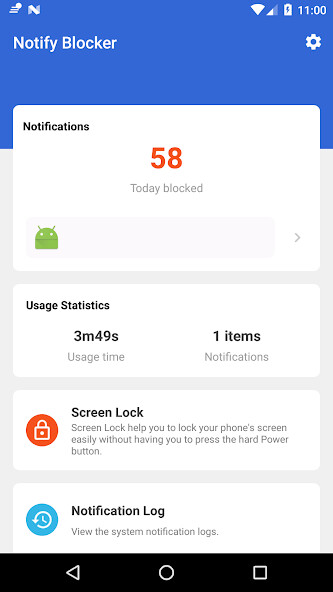
Run this app named Notification Cleaner Blocker using MyAndroid.
You can do it using our Android online emulator.
MAYBE THE BEST NOTIFICATION CLEANER AVAILABLE
NotifyBlocker - Block junk notifications smartly, one-tap clean to keep your notification bar clear.
New Features:
Hide System Notifications for Android O and above, for example: hide ".
running in the background" notification, hide ".
displaying over other apps" notification, hide "USB charing this device" notification.
Useless notifications will be blocked smartly and gathered together in one place, so the phone notification bar will always be in a clean and tidy status.
The app stops trash notifications from jamming and slowing down your phone, keeping your phone free from disturbing and annoying notifications.
Features following KISS principles:
Ability to go ad-free for 3 days by just watching a video
Collect annoying useless notifications to make phone more efficient
Support blocking heads-up notifications (< Android O)
Hide Android System Notifications, for example: ".
running in the background"
Show notification history logs
List of blocked notifications so you don't miss anything
Block work notifications
One tap to clean all of the junk notifications
Minimal Apk Size, Minimize Memory Usage and Battery Saving
Without Root and ONLY necessary permissions required
Stable, robust, safe, fast
Material Design
Free
Grant Notification Access permission:
Notification Access must be enabled for NotifyBlocker in order to block notifications.
When it is disabled, the app will guide you to the settings to enable it.
Don't worry, the app will NOT collect and upload any of your privacy in the notifications.
Find blocked notifications:
All of the junk notifications are put together in the NotifyBlocker app.
Click NotifyBlocker on the notification bar you will enter Notifications screen and find all unread junk notifications.
You can also launch the NotifyBlocker app to find them.
Customize the blocking rules:
If the default blocking rules can't meet your requirements.
Please goto [NotifyBlocker -> Settings] to change the rule of specific app.
To block heads-up notifications, click the application and follow the prompts.
Known issue:
On some devices, the app may be stopped by some memory clean or security apps.
Please add the NotifyBlocker into their white list manually.
Android O:
Google does not allow apps to show popups over status bar anymore, therefor the Heads-up feature is disabled on Android O!
Use cases
disable securityLogAgent notification on Samsung devices WITHOUT root
How to tell us what you think about NotifyBlocker?
Send us email: [email protected]
Follow us on Facebook: https: //www.facebook.com/NotifyBlocker
Help on translations: https: //poeditor.com/join/project/5La820HRTD
NotifyBlocker - Block junk notifications smartly, one-tap clean to keep your notification bar clear.
New Features:
Hide System Notifications for Android O and above, for example: hide ".
running in the background" notification, hide ".
displaying over other apps" notification, hide "USB charing this device" notification.
Useless notifications will be blocked smartly and gathered together in one place, so the phone notification bar will always be in a clean and tidy status.
The app stops trash notifications from jamming and slowing down your phone, keeping your phone free from disturbing and annoying notifications.
Features following KISS principles:
Ability to go ad-free for 3 days by just watching a video
Collect annoying useless notifications to make phone more efficient
Support blocking heads-up notifications (< Android O)
Hide Android System Notifications, for example: ".
running in the background"
Show notification history logs
List of blocked notifications so you don't miss anything
Block work notifications
One tap to clean all of the junk notifications
Minimal Apk Size, Minimize Memory Usage and Battery Saving
Without Root and ONLY necessary permissions required
Stable, robust, safe, fast
Material Design
Free
Grant Notification Access permission:
Notification Access must be enabled for NotifyBlocker in order to block notifications.
When it is disabled, the app will guide you to the settings to enable it.
Don't worry, the app will NOT collect and upload any of your privacy in the notifications.
Find blocked notifications:
All of the junk notifications are put together in the NotifyBlocker app.
Click NotifyBlocker on the notification bar you will enter Notifications screen and find all unread junk notifications.
You can also launch the NotifyBlocker app to find them.
Customize the blocking rules:
If the default blocking rules can't meet your requirements.
Please goto [NotifyBlocker -> Settings] to change the rule of specific app.
To block heads-up notifications, click the application and follow the prompts.
Known issue:
On some devices, the app may be stopped by some memory clean or security apps.
Please add the NotifyBlocker into their white list manually.
Android O:
Google does not allow apps to show popups over status bar anymore, therefor the Heads-up feature is disabled on Android O!
Use cases
disable securityLogAgent notification on Samsung devices WITHOUT root
How to tell us what you think about NotifyBlocker?
Send us email: [email protected]
Follow us on Facebook: https: //www.facebook.com/NotifyBlocker
Help on translations: https: //poeditor.com/join/project/5La820HRTD
MyAndroid is not a downloader online for Notification Cleaner Blocker. It only allows to test online Notification Cleaner Blocker with apkid com.hanstudio.notifyblocker. MyAndroid provides the official Google Play Store to run Notification Cleaner Blocker online.
