

We provide GS Ampevo App online (apkid: com.gsampevoapp) in order to run this application in our online Android emulator.
Description:
Run this app named GS Ampevo App using MyAndroid.
You can do it using our Android online emulator.
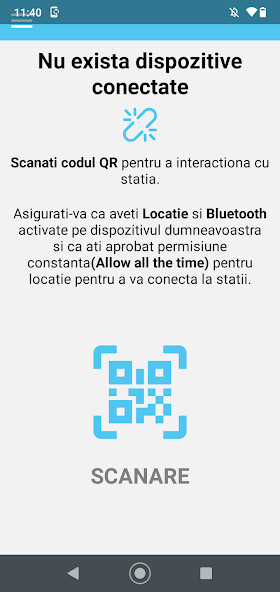
This application allows you to connect to the Ampevo-CP charging stations.
The connection with the station is made via bluetooth.
To connect to the charging station using the app, you must scan the charger's QR code and enter the charging stations user PIN code.
After you are connected you can visualize if an electric vehicle is connected to the station, start and stop the charging of the connected electric vehicle and see the power consumption in real time.
To access and change the charing stations settings and configuration you must go to Settings and use the administrators PIN code.
From the Settings page, you will be able to change the charging stations operating mode, the maximum allowed current, the PIN and add or delete RFID tags.
After you connect successfully to a charging station, it is saved in the application so you wont have to scan the charging stations QR code every time.
Depending of the charging stations operating mode you can start the charging automatically (plug and charge), using a registered RFID tag or using the application.
The connection with the station is made via bluetooth.
To connect to the charging station using the app, you must scan the charger's QR code and enter the charging stations user PIN code.
After you are connected you can visualize if an electric vehicle is connected to the station, start and stop the charging of the connected electric vehicle and see the power consumption in real time.
To access and change the charing stations settings and configuration you must go to Settings and use the administrators PIN code.
From the Settings page, you will be able to change the charging stations operating mode, the maximum allowed current, the PIN and add or delete RFID tags.
After you connect successfully to a charging station, it is saved in the application so you wont have to scan the charging stations QR code every time.
Depending of the charging stations operating mode you can start the charging automatically (plug and charge), using a registered RFID tag or using the application.
MyAndroid is not a downloader online for GS Ampevo App. It only allows to test online GS Ampevo App with apkid com.gsampevoapp. MyAndroid provides the official Google Play Store to run GS Ampevo App online.
