

We provide Add Watermark and Photo Editor online (apkid: com.futuretech.watermark.editor) in order to run this application in our online Android emulator.
Description:
Run this app named Add Watermark and Photo Editor using MyAndroid.
You can do it using our Android online emulator.
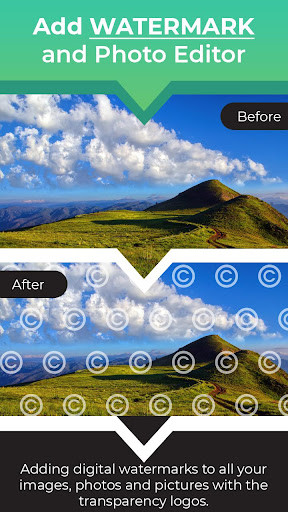
Add Watermark and Photo Editor is an app for adding digital watermarks to all your text, images, photos and pictures with the transparency logos.
Copyright Symbols Make your watermark official with a copyright, trademark or a registered symbol.
Add your watermarks from gallery or capture it from camera then add it in Watermark Editor.
Put your own formatted text or a logo image into your picture, crop, adjust its size, transparency, rotation, then save and share it.
Custom Text Watermarks - Create fully customized watermarks in seconds.
Edit text, color, font, size, rotation, transparency and more.
Add Watermark and Photo Editor App Features :
- View all generated watermark images into Your Creation as gallery.
You can delete and share images from Watermark Gallery.
- Add watermark image or text or stickers, photo to create watermark on your photos.
- Adjust your watermark icon or logo on your photos; drag it, zoom it and rotate it.
Adjust its opacity precisely with the progress slider.
- Add your own Watermark Image/Logo
- Add Copyright text on images
- Apply font family and color on photo
- Various Filters for photos
- Photo Effects and image editor
- Settings for Brightness, Contrast, Saturation, Sharpness
- Add your own watermark logo and text to photos
- Photo Watermark Maker and Watermark Editor
- Photo Watermark, Watermark on Photo, Add Watermark on Photos
Copyright Symbols Make your watermark official with a copyright, trademark or a registered symbol.
Add your watermarks from gallery or capture it from camera then add it in Watermark Editor.
Put your own formatted text or a logo image into your picture, crop, adjust its size, transparency, rotation, then save and share it.
Custom Text Watermarks - Create fully customized watermarks in seconds.
Edit text, color, font, size, rotation, transparency and more.
Add Watermark and Photo Editor App Features :
- View all generated watermark images into Your Creation as gallery.
You can delete and share images from Watermark Gallery.
- Add watermark image or text or stickers, photo to create watermark on your photos.
- Adjust your watermark icon or logo on your photos; drag it, zoom it and rotate it.
Adjust its opacity precisely with the progress slider.
- Add your own Watermark Image/Logo
- Add Copyright text on images
- Apply font family and color on photo
- Various Filters for photos
- Photo Effects and image editor
- Settings for Brightness, Contrast, Saturation, Sharpness
- Add your own watermark logo and text to photos
- Photo Watermark Maker and Watermark Editor
- Photo Watermark, Watermark on Photo, Add Watermark on Photos
MyAndroid is not a downloader online for Add Watermark and Photo Editor. It only allows to test online Add Watermark and Photo Editor with apkid com.futuretech.watermark.editor. MyAndroid provides the official Google Play Store to run Add Watermark and Photo Editor online.
