

We provide Smooth - Icon Pack online (apkid: com.fldesign.smooth.iconpack) in order to run this application in our online Android emulator.
Description:
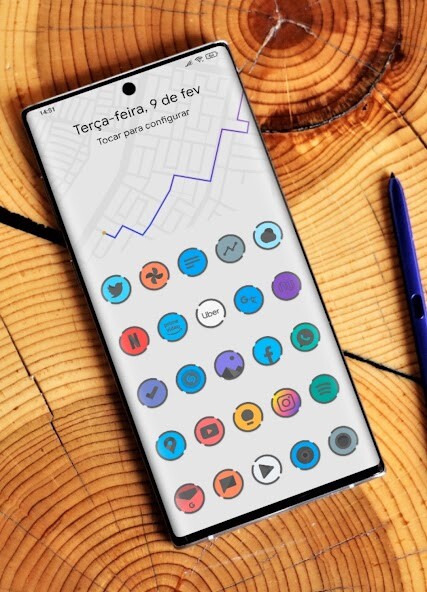
Run this app named Smooth - Icon Pack using MyAndroid.
You can do it using our Android online emulator.
Features:
2500+ high quality Icons.
Frequent Updates.
Alternative Icons.
Dynamic Calendar support.
Icon Request Tool.
Icon Search.
On some launchers you need to enter the launcher settings to activate the icon pack.
If you are using OnePlus launcher just enter the launcher settings: hold your finger on the home screen, then click "icons".
Supports
Nova Launcher
One Plus Launcher
Apex Launcher
Poco Launcher
Go Launcher
ADW2
Niagara Launcher
Action Launcher
ABC Launcher
Aviate Launcher
Evie Launcher
Holo Launcher
ICS Holo Launcher
Lucid Launcher
M launcher
Zero launcher
V Launcher
Smart Launcher
Mix Launcher
Cool Pixel Launcher
Lawnchair Launcher
Super P Launcher
Rootles Launcher
Solo Launcher and many more.
How to Apply Icons with Smooth - Icon Pack
1- Open Smooth - Icon Pack
2- Navigate to Apply Smooth
3- Select Your Launcher
4- Enjoy Your New Theme : )
Stay in touch:
https: //twitter.com/FLDesign5
https: //www.instagram.com/fl_icon_design/
2500+ high quality Icons.
Frequent Updates.
Alternative Icons.
Dynamic Calendar support.
Icon Request Tool.
Icon Search.
On some launchers you need to enter the launcher settings to activate the icon pack.
If you are using OnePlus launcher just enter the launcher settings: hold your finger on the home screen, then click "icons".
Supports
Nova Launcher
One Plus Launcher
Apex Launcher
Poco Launcher
Go Launcher
ADW2
Niagara Launcher
Action Launcher
ABC Launcher
Aviate Launcher
Evie Launcher
Holo Launcher
ICS Holo Launcher
Lucid Launcher
M launcher
Zero launcher
V Launcher
Smart Launcher
Mix Launcher
Cool Pixel Launcher
Lawnchair Launcher
Super P Launcher
Rootles Launcher
Solo Launcher and many more.
How to Apply Icons with Smooth - Icon Pack
1- Open Smooth - Icon Pack
2- Navigate to Apply Smooth
3- Select Your Launcher
4- Enjoy Your New Theme : )
Stay in touch:
https: //twitter.com/FLDesign5
https: //www.instagram.com/fl_icon_design/
MyAndroid is not a downloader online for Smooth - Icon Pack. It only allows to test online Smooth - Icon Pack with apkid com.fldesign.smooth.iconpack. MyAndroid provides the official Google Play Store to run Smooth - Icon Pack online.
