
We provide Ergonotes online (apkid: com.ergonotes) in order to run this application in our online Android emulator.
Description:
Run this app named Ergonotes using MyAndroid.
You can do it using our Android online emulator.
Ergonomics:
The app arose from the observation that the majority of smartphone users control it with their thumbs, holding it in both hands, especially when the smartphone is used on the go.
Nonetheless, there are controls in every app that force the user to release the grip and move their hands to the top of the screen.
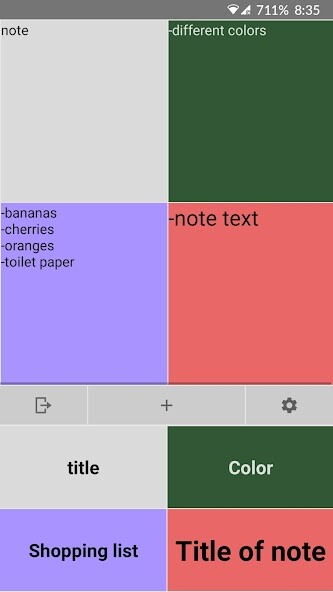
During the development of Ergonotes, care was taken to view the upper area of the screen as a display area that is used to display content.
In contrast, the lower area is intended for controlling the app.
So it was developed according to ergonomic principles, which enables more efficient creation and management of notes.
Customization options:
The app tries, as far as possible, to give the user the choice of how he wants to display his notes.
For example, visually impaired users can set the fonts on their notes to be very large and make texts and background colors rich in contrast to ensure good legibility.
In addition, the number of notes per screen width can be set according to rows and columns.
For example, it is possible to display a single note on the entire screen.
Alternatively, you can divide your notes into any number of rows and columns in a table.
The app dispenses with design solutions that unnecessarily reduce the display area, which is already small on smartphones.
The size of the separating elements is therefore kept as small as possible in order to make the best possible use of the available space.
The app arose from the observation that the majority of smartphone users control it with their thumbs, holding it in both hands, especially when the smartphone is used on the go.
Nonetheless, there are controls in every app that force the user to release the grip and move their hands to the top of the screen.
During the development of Ergonotes, care was taken to view the upper area of the screen as a display area that is used to display content.
In contrast, the lower area is intended for controlling the app.
So it was developed according to ergonomic principles, which enables more efficient creation and management of notes.
Customization options:
The app tries, as far as possible, to give the user the choice of how he wants to display his notes.
For example, visually impaired users can set the fonts on their notes to be very large and make texts and background colors rich in contrast to ensure good legibility.
In addition, the number of notes per screen width can be set according to rows and columns.
For example, it is possible to display a single note on the entire screen.
Alternatively, you can divide your notes into any number of rows and columns in a table.
The app dispenses with design solutions that unnecessarily reduce the display area, which is already small on smartphones.
The size of the separating elements is therefore kept as small as possible in order to make the best possible use of the available space.
MyAndroid is not a downloader online for Ergonotes. It only allows to test online Ergonotes with apkid com.ergonotes. MyAndroid provides the official Google Play Store to run Ergonotes online.
