

We provide Assistive Touch for Android online (apkid: com.easytouch.controlios.asistivetouch) in order to run this application in our online Android emulator.
Description:
Run this app named Assistive Touch for Android using MyAndroid.
You can do it using our Android online emulator.
Assistive Touch is a great and easy support tool for Android devices.
You can easily access to all your favorite apps, games, settings and quick toggle with a floating panel on the screen.
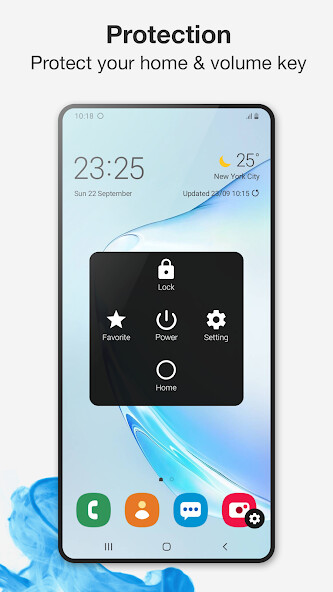
Assistive Touch is also an ideal app to protect the physical buttons (home button and volume button).
It is very useful for big screen smart phone.
Main Features:
-Assistive Touch is an easy tool for Android devices.
With iOS Assistive touch for Android, you can easily access your smartphone features more conveniently
-Easy, fast, smooth, without hanging
-Go to all setting very quick with a touch
-Easy to open your favorite application
-Very useful especially for big screen smart phone and devices with broken physical buttons.
-Protect the physical buttons (home button and volume button): Virtual Home button, easy touch to lock screen and open recent tasks, virtual Volume Button, quick tap to change volume and change sound mode or virtual Back Button.
With Assistive Touch, you can use a simple tap to perform actions such as the following:
+Open the Assistive Touch menu
+Go to the Home Screen
+Double-tap
+Perform multi finger gestures
+Access Control Center, notifications, the Lock Screen, or the App Switcher
+Adjust the volume
+Take a screenshot
-No limitation of customization: change color, background, button size, button position:
+ You can change color of background with your favorite color for Assistive Touch.
+ You can change icon of Assistive Touch easy with many pretty icons.
+ Gesture Setting for Floating Button (One tap, double tap, long press)
How to use Assistive touch for Android?
- Download Assistive touch for Android on Google Play
- Open app and go to Apps setting
- Provide some permissions for the app to work best
- Enable Assistive touch
- Setup Single-tap for Easy touch
- Setup Double-tap for Assistive touch
- Setup Long press for Assistive touch
- Customize:
+ iCon for Assistive touch
+ Color of Background for Assistive touch
+ Pin favorite application in Assistive Touch
+ Menu/ Device of Easy touch
Permission Declarations for Assistive Touch:
+ CAMERA: to turn on Flashlight, not take a photo.
+ READ/WRITE_EXTERNAL_STORAGE: To download and save icon for Assistive Touch.
+ DRAW OVER SCREEN: To show Assistive Touch in over all apps.
+ BIND_ACCESSIBILITY_SERVICE: To allow apps to draw in HOME SCREEN.
App does not use the permission for any other purpose.
The application is only allowed to use this permission with the consent of the user.
If you love our application, please rate for this app 5 stars, dont forget to share the app to your friends.
Thank you so much for downloading and using the Assistive Touch for Android application.
You can easily access to all your favorite apps, games, settings and quick toggle with a floating panel on the screen.
Assistive Touch is also an ideal app to protect the physical buttons (home button and volume button).
It is very useful for big screen smart phone.
Main Features:
-Assistive Touch is an easy tool for Android devices.
With iOS Assistive touch for Android, you can easily access your smartphone features more conveniently
-Easy, fast, smooth, without hanging
-Go to all setting very quick with a touch
-Easy to open your favorite application
-Very useful especially for big screen smart phone and devices with broken physical buttons.
-Protect the physical buttons (home button and volume button): Virtual Home button, easy touch to lock screen and open recent tasks, virtual Volume Button, quick tap to change volume and change sound mode or virtual Back Button.
With Assistive Touch, you can use a simple tap to perform actions such as the following:
+Open the Assistive Touch menu
+Go to the Home Screen
+Double-tap
+Perform multi finger gestures
+Access Control Center, notifications, the Lock Screen, or the App Switcher
+Adjust the volume
+Take a screenshot
-No limitation of customization: change color, background, button size, button position:
+ You can change color of background with your favorite color for Assistive Touch.
+ You can change icon of Assistive Touch easy with many pretty icons.
+ Gesture Setting for Floating Button (One tap, double tap, long press)
How to use Assistive touch for Android?
- Download Assistive touch for Android on Google Play
- Open app and go to Apps setting
- Provide some permissions for the app to work best
- Enable Assistive touch
- Setup Single-tap for Easy touch
- Setup Double-tap for Assistive touch
- Setup Long press for Assistive touch
- Customize:
+ iCon for Assistive touch
+ Color of Background for Assistive touch
+ Pin favorite application in Assistive Touch
+ Menu/ Device of Easy touch
Permission Declarations for Assistive Touch:
+ CAMERA: to turn on Flashlight, not take a photo.
+ READ/WRITE_EXTERNAL_STORAGE: To download and save icon for Assistive Touch.
+ DRAW OVER SCREEN: To show Assistive Touch in over all apps.
+ BIND_ACCESSIBILITY_SERVICE: To allow apps to draw in HOME SCREEN.
App does not use the permission for any other purpose.
The application is only allowed to use this permission with the consent of the user.
If you love our application, please rate for this app 5 stars, dont forget to share the app to your friends.
Thank you so much for downloading and using the Assistive Touch for Android application.
MyAndroid is not a downloader online for Assistive Touch for Android. It only allows to test online Assistive Touch for Android with apkid com.easytouch.controlios.asistivetouch. MyAndroid provides the official Google Play Store to run Assistive Touch for Android online.
