
We provide Scanner - App PDF CamScanner online (apkid: com.devappzon.mobilepdfscanner) in order to run this application in our online Android emulator.
Description:
Run this app named Scanner - App PDF CamScanner using MyAndroid.
You can do it using our Android online emulator.
PDF scanner is a quick scanner app that scan pdf, scan documents, and export high-quality multipage pdf by the camera
The QuickScan app is 100% FREE.
the application QuickScan will turn your device into a powerful scanner that will help you be more productive in your work and daily life.
To scan a pdf, you place any document in front of the scanner of your mobile's camera: the PDF scanner application will automatically recognize the 4 corners of the document in the background to crop and clean up the result.
You will get a clean, easy, and high-quality pdf to read.
Batch scan mode allows you to quickly scan dozens of pages of documents.
The PDF scanner can powerfully scan different types of documents into pdf, scan ID cards, online assignments, contracts, books.
document scanner suitable for those who do paperwork in the office, students study and work from home send homework online to your teacher, or anyone need to scan pdf file.
How pdf scanner is helpful in your life :
Office Assistant document scanner app for Android simplifies paperwork anytime, anywhere
Scanner app can help business people on business trips to scan pdf, scannable contracts, business cards, receipts, invoices, documents and send them to partners or clients
Scan all ID cards, passports, driver's license, plane tickets, visas, work permits, and other identification documents in seconds, save and share with the pdf scanner app
Scan and save important photos, documents can use pdf files to print anytime
Students study pdf home scan form for homework, teacher lectures, ppt, books for exams
The application can also automatically recognize text (OCR).
instantly scan, save and share any document in PDF, JPG formats.
Go paperless with our fast PDF scanner - store all your documents in a neat mobile office, right on your phone.
DOCUMENT SCANNER
This small but powerful free scanner application is essential for students and anyone working in a small business: accountants, realtors, managers, or lawyers.
Scan everything you need, including receipts, contracts, paper notes, faxes, books, and store your scans as multipage PDF or JPG files.
Main Features of PDF Scanner:
DIFFERENT SCAN MODES :
1.
Scan all ID cards, passports, driver's license, plane tickets, visas, work permits, and other identification documents in seconds, save and share with the pdf scanner app
2.
A mode specially designed for fast and convenient scanning of identity documents.
3.
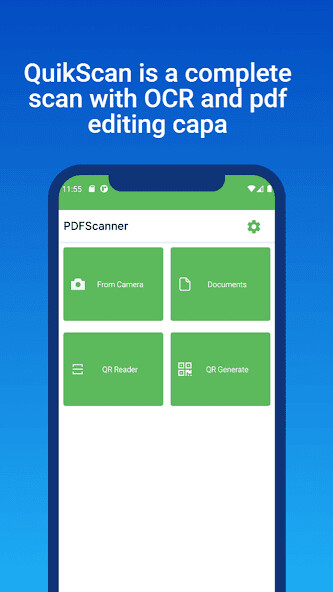
QR CODE (Read and Write )
4.
Read any QR code with your device's camera.
SHARE EASILY
1.
Share files for commenting or viewing in WhatsApp, iMessage, Microsoft Teams.
2.
Receive activity notifications for files you've shared.
3.
Attachment to an email or send the link to the document.
INNOVATIVE PDF SCANNER
1.
Scan documents and photos in PDF, JPG, or TXT format.
2.
Easily scan multiple pages into a single document
3.
Recognize text from any scannable object with OCR
4.
Put your electronic signature on the documents
VERY PRACTICAL DOCUMENT EDITOR AND FILE MANAGER
1.
Edit scans using color correction and noise removal features
2.
Use a file manager with folders, drag and drop and document editing functions.
3.
Protect your confidential scans by locking files with a PIN code.
EASY DOCUMENT SHARING
1.
Scan documents and share them with just a few clicks.
2.
Share and upload scanned documents to cloud services like Dropbox, Google Drive, Evernote, OneDrive.
With this free and secure scanner app, all scanned or exported documents are stored locally on your phone, and neither we nor any third party can access them.
The QuickScan app is 100% FREE.
the application QuickScan will turn your device into a powerful scanner that will help you be more productive in your work and daily life.
To scan a pdf, you place any document in front of the scanner of your mobile's camera: the PDF scanner application will automatically recognize the 4 corners of the document in the background to crop and clean up the result.
You will get a clean, easy, and high-quality pdf to read.
Batch scan mode allows you to quickly scan dozens of pages of documents.
The PDF scanner can powerfully scan different types of documents into pdf, scan ID cards, online assignments, contracts, books.
document scanner suitable for those who do paperwork in the office, students study and work from home send homework online to your teacher, or anyone need to scan pdf file.
How pdf scanner is helpful in your life :
Office Assistant document scanner app for Android simplifies paperwork anytime, anywhere
Scanner app can help business people on business trips to scan pdf, scannable contracts, business cards, receipts, invoices, documents and send them to partners or clients
Scan all ID cards, passports, driver's license, plane tickets, visas, work permits, and other identification documents in seconds, save and share with the pdf scanner app
Scan and save important photos, documents can use pdf files to print anytime
Students study pdf home scan form for homework, teacher lectures, ppt, books for exams
The application can also automatically recognize text (OCR).
instantly scan, save and share any document in PDF, JPG formats.
Go paperless with our fast PDF scanner - store all your documents in a neat mobile office, right on your phone.
DOCUMENT SCANNER
This small but powerful free scanner application is essential for students and anyone working in a small business: accountants, realtors, managers, or lawyers.
Scan everything you need, including receipts, contracts, paper notes, faxes, books, and store your scans as multipage PDF or JPG files.
Main Features of PDF Scanner:
DIFFERENT SCAN MODES :
1.
Scan all ID cards, passports, driver's license, plane tickets, visas, work permits, and other identification documents in seconds, save and share with the pdf scanner app
2.
A mode specially designed for fast and convenient scanning of identity documents.
3.
QR CODE (Read and Write )
4.
Read any QR code with your device's camera.
SHARE EASILY
1.
Share files for commenting or viewing in WhatsApp, iMessage, Microsoft Teams.
2.
Receive activity notifications for files you've shared.
3.
Attachment to an email or send the link to the document.
INNOVATIVE PDF SCANNER
1.
Scan documents and photos in PDF, JPG, or TXT format.
2.
Easily scan multiple pages into a single document
3.
Recognize text from any scannable object with OCR
4.
Put your electronic signature on the documents
VERY PRACTICAL DOCUMENT EDITOR AND FILE MANAGER
1.
Edit scans using color correction and noise removal features
2.
Use a file manager with folders, drag and drop and document editing functions.
3.
Protect your confidential scans by locking files with a PIN code.
EASY DOCUMENT SHARING
1.
Scan documents and share them with just a few clicks.
2.
Share and upload scanned documents to cloud services like Dropbox, Google Drive, Evernote, OneDrive.
With this free and secure scanner app, all scanned or exported documents are stored locally on your phone, and neither we nor any third party can access them.
MyAndroid is not a downloader online for Scanner - App PDF CamScanner. It only allows to test online Scanner - App PDF CamScanner with apkid com.devappzon.mobilepdfscanner. MyAndroid provides the official Google Play Store to run Scanner - App PDF CamScanner online.
