
We provide Dementia Clock online (apkid: com.dementiaclock.dementiaclock) in order to run this application in our online Android emulator.
Description:
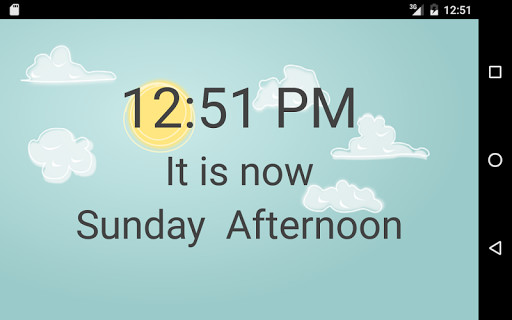
Run this app named Dementia Clock using MyAndroid.
You can do it using our Android online emulator.
A large-type digital clock "screen saver" (or "Daydream", on some versions of Android), especially suited to helping those suffering from dementia stay oriented with respect to time.
Of course, the app is also useful for anyone who wants their phone to display the time and date while it charges.
The clock appears when your Android phone goes to sleep while connected to a charger.
If the phone is NOT connected to a power source,
the clock will NOT appear, thus preventing battery drain.
Days of the week and names of months are fully spelled out.
Please note that the following instructions may not apply exactly to all phones, but they give a general guide:
After downloading the app, go to your phone's display settings and select "Screen saver" (on some phones, this may be called "Daydream" instead).
You will be presented with a list of available screen savers (or daydreams).
Choose "Dementia Clock".
When your phone detects that there has been no activity for a while (you can adjust this by clicking on "Screen timeout" in display settings) AND
it is connected to a power supply, the clock will appear.
When you touch the screen, the clock disappears and you are presented with your lock screen,
so you can use your phone, as usual.
(Of course, if you have not set a lock on your phone, you will go directly to your home screen.)
Note: Clicking on the Dementia Clock icon doesn't do much.
At present, there are no user-controlled options.
All you have to do
is choose Dementia Clock as your screen saver in Settings, as described above.
Technical note: Screen savers were originally developed to prevent static images from becoming "burnt" into CRT screens (hence the name).
Cell phone
screens are based on technologies that do not suffer from such burn-in, and the largely static image presented by Dementia Clock is not designed to prevent
burn-in.
However, the term "screen saver" persists.
(Perhaps this is a reason why Android is moving toward calling them "Daydreams".)
Of course, the app is also useful for anyone who wants their phone to display the time and date while it charges.
The clock appears when your Android phone goes to sleep while connected to a charger.
If the phone is NOT connected to a power source,
the clock will NOT appear, thus preventing battery drain.
Days of the week and names of months are fully spelled out.
Please note that the following instructions may not apply exactly to all phones, but they give a general guide:
After downloading the app, go to your phone's display settings and select "Screen saver" (on some phones, this may be called "Daydream" instead).
You will be presented with a list of available screen savers (or daydreams).
Choose "Dementia Clock".
When your phone detects that there has been no activity for a while (you can adjust this by clicking on "Screen timeout" in display settings) AND
it is connected to a power supply, the clock will appear.
When you touch the screen, the clock disappears and you are presented with your lock screen,
so you can use your phone, as usual.
(Of course, if you have not set a lock on your phone, you will go directly to your home screen.)
Note: Clicking on the Dementia Clock icon doesn't do much.
At present, there are no user-controlled options.
All you have to do
is choose Dementia Clock as your screen saver in Settings, as described above.
Technical note: Screen savers were originally developed to prevent static images from becoming "burnt" into CRT screens (hence the name).
Cell phone
screens are based on technologies that do not suffer from such burn-in, and the largely static image presented by Dementia Clock is not designed to prevent
burn-in.
However, the term "screen saver" persists.
(Perhaps this is a reason why Android is moving toward calling them "Daydreams".)
MyAndroid is not a downloader online for Dementia Clock. It only allows to test online Dementia Clock with apkid com.dementiaclock.dementiaclock. MyAndroid provides the official Google Play Store to run Dementia Clock online.
