

We provide CrontoSign Swiss online (apkid: com.cronto.crontosign.swiss) in order to run this application in our online Android emulator.
Description:
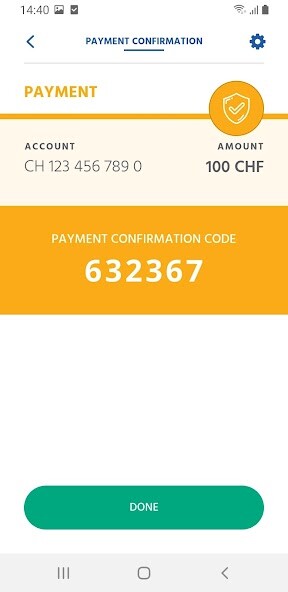
Run this app named CrontoSign Swiss using MyAndroid.
You can do it using our Android online emulator.
How it works:
The login and transaction data that you enter in your e-banking are encoded in a colored mosaic.
The mosaic is displayed in your e-banking and then photographed using the camera in your smartphone.
The data contained in the mosaic and the associated authorization code will be decoded by this app on your phone and displayed for verification.
Because your app is activated with a personal key, the mosaic on the screen can be decrypted only by your smartphone.
Your smartphone does not require any Internet or mobile network connection.
If needed, CrontoSign Swiss can be installed on multiple smartphones and can also be used with all banks that support CrontoSign Swiss.
Legal Notice:
We point out that, by downloading, installing and using this application a third party (such as Google) may infer an existing, former or future client relationship between you and your bank.
By downloading this app, you expressly agree that the information you provide to Google is collected, transferred, processed and can be made available in accordance with their terms.
The terms and conditions of Google, to which you agree, are to be distinguished from the legal notice of your bank.
The login and transaction data that you enter in your e-banking are encoded in a colored mosaic.
The mosaic is displayed in your e-banking and then photographed using the camera in your smartphone.
The data contained in the mosaic and the associated authorization code will be decoded by this app on your phone and displayed for verification.
Because your app is activated with a personal key, the mosaic on the screen can be decrypted only by your smartphone.
Your smartphone does not require any Internet or mobile network connection.
If needed, CrontoSign Swiss can be installed on multiple smartphones and can also be used with all banks that support CrontoSign Swiss.
Legal Notice:
We point out that, by downloading, installing and using this application a third party (such as Google) may infer an existing, former or future client relationship between you and your bank.
By downloading this app, you expressly agree that the information you provide to Google is collected, transferred, processed and can be made available in accordance with their terms.
The terms and conditions of Google, to which you agree, are to be distinguished from the legal notice of your bank.
MyAndroid is not a downloader online for CrontoSign Swiss. It only allows to test online CrontoSign Swiss with apkid com.cronto.crontosign.swiss. MyAndroid provides the official Google Play Store to run CrontoSign Swiss online.
