
We provide ConnectlocalM shop online (apkid: com.connectlocalm.shopapp) in order to run this application in our online Android emulator.
Description:
Run this app named ConnectlocalM shop using MyAndroid.
You can do it using our Android online emulator.
Set your business on ConnectlocalM (CL) in 3 easy steps.
It will just take few minutes:
- Download the ConnectlocalM shop App and register your business.
- Customize CL shop to your business needs: Review/Set the order policy.
Add, Edit or Delete items and set price (Bulk items import available if CL is not able to pre-populate the items).
- Invite customers.
You will just need customer's mobile number.
A link will be sent through SMS to the first time customers to download the customer App from google play.
Just try it! it will not take more than 10 Min.
Install shop App-> Register(You will need Shop name, Address, Your name, Email ID and Mobile number)-> Go to Shop App Complete the registration-> Orders screen will show up, but it is empty-> "Items" will list the default items-> Now, go to "Customer"-> Invite the customer by Mobile number.
(Just to try out, use your mobile number!!)-> You will get SMS link-> Install the customer App-> Open and Place the order-> Come back to Shop App-> "Refresh"-> Order will get listed-> Just tap on order-> "Accept" the order-> Customer App will get notification in the couple of minutes-> Tap on the order and select "Order ready"-> Customer is notified that order is ready-> select Order "Delivered" and then "Close" the the order-> Congratulations!! You are just through with the basic order processing.
CL has three interfaces:
Web application: Used for Shop setup and management.
- Review/Customize shop order policies according to your business needs.
- Manage Items (Add, edit or delete items).
- Download the Excel reports for the orders processed.
- Select payment plan that fits your requirement.
- Feedback to CL about issues/enhancements
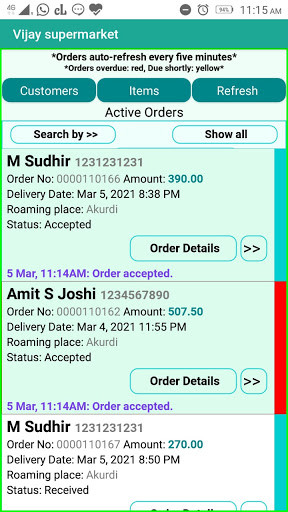
Shop Mobile application (ConnectlocalM shop): Used by business for order management.
- Receive and manage the orders (accept, reschedule, notify to customer when order is ready, delivered etc.
OR cancel the orders).
- Exchange/view order specific messages.
- Change the price of items.
Hide/Show the items to the customers depending on availability.
- Invite customers.
- Broadcast Offers and Advertisements to all customers.
- View the consolidated list of ordered items for the active orders.
Customer Mobile application (ConnectlocalM customer): Used by customers to place orders, acknowledge the order delivery.
- Place order.
Set delivery place and time based on the order policy you set.
- Exchange/view order specific messages.
- Reschedule or cancel order ( based on order policy you set).
- View the Offers and Advertisements.
- Get notifications at the each stage of the order processing .
Useful to:
CL is a very versatile platform.
It does not matter what business you do.
let it be a medical store, food outlet, restaurants, grocery/wholesale shop, direct farm to customers outlet, home business, vegetable outlet, traders of all kind of goods and many more.
MyAndroid is not a downloader online for ConnectlocalM shop. It only allows to test online ConnectlocalM shop with apkid com.connectlocalm.shopapp. MyAndroid provides the official Google Play Store to run ConnectlocalM shop online.
