

We provide iPin Ruler Pro online (apkid: com.conary.ipinrulerpro) in order to run this application in our online Android emulator.
Description:
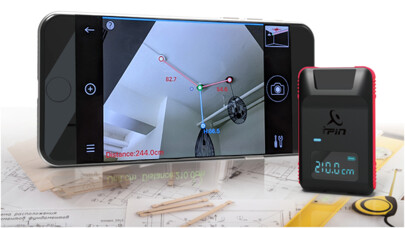
Run this app named iPin Ruler Pro using MyAndroid.
You can do it using our Android online emulator.
The iPin Spatial Ruler Pro is the optical laser measuring tool designed to make lives easier for those who need handy and quickly measure item with smart phone.
This is a user-friendly, without compromising on functionalities, design or accuracy product.
Also, it is the world's first laser range finder pairing with your smartphone camera to measure the distance, line and dimension, pluses the 3-axis measurement (height, width, and length) of any object in one photo shot.
It is so powerful to make measuring job done faster and without any hassle.
\tThree easy steps to work
1.
AIM: Turn on the App and simply attach the iPin Spatial Ruler Pro on the back of your smartphone.
Aim the phone camera at the horizontal ground near the object you want to measure.
2.
Shoot: Take a photo using your smartphone camera.
3.
Size: The photo you took contains all measurements data.
Adjust the 3-axis points manually with your fingertips to measure the object you want.
\tWhy we developed it?
\tIt was first developed to resolve the "inconveniences" in the measurement with traditional practice.
\tIn the traditional and time consuming process of measuring, you would need a tape measure, ladder, camera, paper records, and moving around in the space.
With smartphone camera and iPin Spatial Ruler Pro together, you are free from moving point to point repeatedly as in the traditional measuring process.
You dont need to climb up a ladder or kneel down to touch the ground just to get some data.
Moreover, iPin Spatial Ruler Pro App uses phone camera to take photo and saves the measuring data with the image in the phone.
So, you can re-measure any part of that photo with fingertips whenever needed.
\tFeatures: Shoot first and measure later
With iPin Spatial Ruler Pro App, measured data is saved within the photo taken.
You can measure any object in the saved photo at your fingertips whenever needed.
\tFeatures: 3-axis measuring
The ceiling corner area is always difficult to reach and measure.
We have created the 3-axis measuring, an efficient new approach to measure the high corner area from the photo shot taken from smartphone camera with the powerful iPin Spatial Ruler Pro and App.
\tFeatures: Use it alone
You can use it alone as a laser range finder to measure distance up to 40 meters.
\tFeatures: Online sharing photos with measured data
Easily share the photo image with measurement data through Whatsapp, Line, WeChat, E-mail
\tTechnical Specifications
Size \t80.3 x 48.3 x 29.9 (mm)
Weight \t80 g
Laser output \t< 1 mW; Class II
Laser wavelength \tTyp.
635 nm; Red light
Operating system required \tApple iOS 10.0 and later; Android OS 7.0 and later
Battery \t300 mAH
Display \tOLED
Smartphone connection \tBluetooth LE 4.2
Distance measurement \tUp to 40 meters ( 3 mm)
Operation mode \t\t Use it alone;
\t Connect to smart-phone
App features \t\t Distance;
\t Length;
\t Dimension;
\t 3-axis measurement;
\t Data-photo recording;
\t Internet sharing;
\t Re-measurement;
This is a user-friendly, without compromising on functionalities, design or accuracy product.
Also, it is the world's first laser range finder pairing with your smartphone camera to measure the distance, line and dimension, pluses the 3-axis measurement (height, width, and length) of any object in one photo shot.
It is so powerful to make measuring job done faster and without any hassle.
\tThree easy steps to work
1.
AIM: Turn on the App and simply attach the iPin Spatial Ruler Pro on the back of your smartphone.
Aim the phone camera at the horizontal ground near the object you want to measure.
2.
Shoot: Take a photo using your smartphone camera.
3.
Size: The photo you took contains all measurements data.
Adjust the 3-axis points manually with your fingertips to measure the object you want.
\tWhy we developed it?
\tIt was first developed to resolve the "inconveniences" in the measurement with traditional practice.
\tIn the traditional and time consuming process of measuring, you would need a tape measure, ladder, camera, paper records, and moving around in the space.
With smartphone camera and iPin Spatial Ruler Pro together, you are free from moving point to point repeatedly as in the traditional measuring process.
You dont need to climb up a ladder or kneel down to touch the ground just to get some data.
Moreover, iPin Spatial Ruler Pro App uses phone camera to take photo and saves the measuring data with the image in the phone.
So, you can re-measure any part of that photo with fingertips whenever needed.
\tFeatures: Shoot first and measure later
With iPin Spatial Ruler Pro App, measured data is saved within the photo taken.
You can measure any object in the saved photo at your fingertips whenever needed.
\tFeatures: 3-axis measuring
The ceiling corner area is always difficult to reach and measure.
We have created the 3-axis measuring, an efficient new approach to measure the high corner area from the photo shot taken from smartphone camera with the powerful iPin Spatial Ruler Pro and App.
\tFeatures: Use it alone
You can use it alone as a laser range finder to measure distance up to 40 meters.
\tFeatures: Online sharing photos with measured data
Easily share the photo image with measurement data through Whatsapp, Line, WeChat, E-mail
\tTechnical Specifications
Size \t80.3 x 48.3 x 29.9 (mm)
Weight \t80 g
Laser output \t< 1 mW; Class II
Laser wavelength \tTyp.
635 nm; Red light
Operating system required \tApple iOS 10.0 and later; Android OS 7.0 and later
Battery \t300 mAH
Display \tOLED
Smartphone connection \tBluetooth LE 4.2
Distance measurement \tUp to 40 meters ( 3 mm)
Operation mode \t\t Use it alone;
\t Connect to smart-phone
App features \t\t Distance;
\t Length;
\t Dimension;
\t 3-axis measurement;
\t Data-photo recording;
\t Internet sharing;
\t Re-measurement;
MyAndroid is not a downloader online for iPin Ruler Pro. It only allows to test online iPin Ruler Pro with apkid com.conary.ipinrulerpro. MyAndroid provides the official Google Play Store to run iPin Ruler Pro online.
