
We provide Kotlin for Android: Training online (apkid: com.chillcoding.kotlin) in order to run this application in our online Android emulator.
Description:
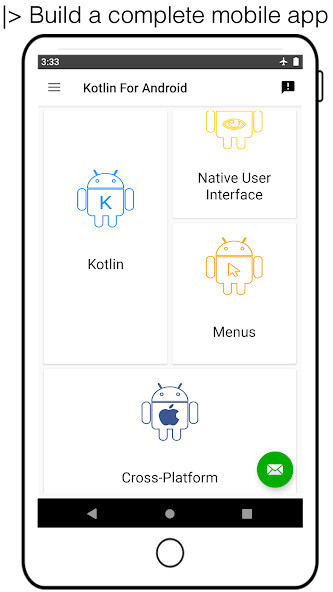
Run this app named Kotlin for Android: Training using MyAndroid.
You can do it using our Android online emulator.
The Android Mobile Development fundamentals are taught through up-to-date code and last libraries:
5.
Have fun in learning
4.
Follow the good practices
3.
Challenge yourself with concrete coding
2.
Build a complete mobile application
1.
Master the Android essentials with quiz
0.
Ready to take external exams and job interviews?
Exclusively available on Google Play and entirely coded with Kotlin language,
Kotlin For Android is more than a show case of the most popular Android development.
|> Start Coding in Kotlin
Learn Kotlin language by developing a cool and fun Android app.
Note: Kotlin is a modern statically programming language,
allows you to write better faster and stronger Android apps.
|> Design an awesome UI
Learn to use native graphic components with Material Design rules.
|> Learn Android SDK:
Build a complete mobile application with Android Studio.
\>Challenge:
topic = 1
while (!course.isFinish()) {
print 'Code the challenge of the topic ' + topic
course.accomplish(topic)
topic++
}
print 'There is ' + topic + ' topics in this course.'
\>Quiz:
What is Kotlin?
A.
It is an Android framework
B.
It is a famous library
C.
It is a modern statically programming language
D.
It is an integrated development environment
Like a game who you are the hero, all the topics, except the first two, can be read in disorder.
/!\ Sorry I can unveil the 11 topics into a single list because "word blocks and vertical/horizontal word lists" is a common violation of Google Play policy!
* 101 Android *
Learn Android by creating a first project with Android Studio.
In this topic, the essentials on Android world, environment development and programming concepts are exposed.
Moreover master the quiz proposed at the end of this course!
* Kotlin *
Learn Kotlin language by developing a cool and fun Android app.
In this topic a challenge is proposed to improve your skills:
start to code a custom view with magic circles, like in Material Design screen of this app.
* Native User Interface *
An advice to be in line with Material Design rules:
Just use native component!
Note: Material Design is an adaptable system of guidelines for phone, tablet and laptop.
It is design rules, in 3D with materials, for UI components to ensure a continuity for user.
Glossary: UI stands for User Interface.
This session contains a User Interface Cheatsheet, some best practices to construct suitable UI and resources tips.
* Menus *
Menus are essential to build a complete app.
From user interface to architecture, this course explain how to deal with navigation graphics components.
* RecyclerView *
RecyclerView is the key to present an item list, it works with an adapter to automate the displaying.
Adapter concept is deepened according to:
+ How it bridges the gap between data and view?
+ What kind of view works?
The challenge of this session is to display a list of the most beautiful beaches.
* User Settings *
User Settings is the beginning to save persistent data, it works with preference library.
First and foremost, it is to show a screen of settings with PreferenceFragmentCompat.
Secondly, it is to read and write key-value data from the default SharedPreferences file.
The challenge of this course is to save the sound preference of the user and to track how many times the app has been opened.
* DataBase *
The local database in mobile app is a good practice to manage offline connection.
This topic provide information on the way to store data with Android file storage or SQLite db.
The challenge is to save some beach in local db using Room library.
* HTTPS Communication *
HTTPS Communication is present in all complete mobile app.
Notion in Client/Server environment are introduced to better understand the mobile client role.
In this topic, the challenge is to get information about countries from a third part, by using the popular Retrofit library.
* Publication *
To never hear the end of Kotlin For Android App: I'm writing a success story.
The truth
5.
Have fun in learning
4.
Follow the good practices
3.
Challenge yourself with concrete coding
2.
Build a complete mobile application
1.
Master the Android essentials with quiz
0.
Ready to take external exams and job interviews?
Exclusively available on Google Play and entirely coded with Kotlin language,
Kotlin For Android is more than a show case of the most popular Android development.
|> Start Coding in Kotlin
Learn Kotlin language by developing a cool and fun Android app.
Note: Kotlin is a modern statically programming language,
allows you to write better faster and stronger Android apps.
|> Design an awesome UI
Learn to use native graphic components with Material Design rules.
|> Learn Android SDK:
Build a complete mobile application with Android Studio.
\>Challenge:
topic = 1
while (!course.isFinish()) {
print 'Code the challenge of the topic ' + topic
course.accomplish(topic)
topic++
}
print 'There is ' + topic + ' topics in this course.'
\>Quiz:
What is Kotlin?
A.
It is an Android framework
B.
It is a famous library
C.
It is a modern statically programming language
D.
It is an integrated development environment
Like a game who you are the hero, all the topics, except the first two, can be read in disorder.
/!\ Sorry I can unveil the 11 topics into a single list because "word blocks and vertical/horizontal word lists" is a common violation of Google Play policy!
* 101 Android *
Learn Android by creating a first project with Android Studio.
In this topic, the essentials on Android world, environment development and programming concepts are exposed.
Moreover master the quiz proposed at the end of this course!
* Kotlin *
Learn Kotlin language by developing a cool and fun Android app.
In this topic a challenge is proposed to improve your skills:
start to code a custom view with magic circles, like in Material Design screen of this app.
* Native User Interface *
An advice to be in line with Material Design rules:
Just use native component!
Note: Material Design is an adaptable system of guidelines for phone, tablet and laptop.
It is design rules, in 3D with materials, for UI components to ensure a continuity for user.
Glossary: UI stands for User Interface.
This session contains a User Interface Cheatsheet, some best practices to construct suitable UI and resources tips.
* Menus *
Menus are essential to build a complete app.
From user interface to architecture, this course explain how to deal with navigation graphics components.
* RecyclerView *
RecyclerView is the key to present an item list, it works with an adapter to automate the displaying.
Adapter concept is deepened according to:
+ How it bridges the gap between data and view?
+ What kind of view works?
The challenge of this session is to display a list of the most beautiful beaches.
* User Settings *
User Settings is the beginning to save persistent data, it works with preference library.
First and foremost, it is to show a screen of settings with PreferenceFragmentCompat.
Secondly, it is to read and write key-value data from the default SharedPreferences file.
The challenge of this course is to save the sound preference of the user and to track how many times the app has been opened.
* DataBase *
The local database in mobile app is a good practice to manage offline connection.
This topic provide information on the way to store data with Android file storage or SQLite db.
The challenge is to save some beach in local db using Room library.
* HTTPS Communication *
HTTPS Communication is present in all complete mobile app.
Notion in Client/Server environment are introduced to better understand the mobile client role.
In this topic, the challenge is to get information about countries from a third part, by using the popular Retrofit library.
* Publication *
To never hear the end of Kotlin For Android App: I'm writing a success story.
The truth
MyAndroid is not a downloader online for Kotlin for Android: Training. It only allows to test online Kotlin for Android: Training with apkid com.chillcoding.kotlin. MyAndroid provides the official Google Play Store to run Kotlin for Android: Training online.
