

We provide tild online (apkid: com.ccei.tild) in order to run this application in our online Android emulator.
Description:
Run this app named tild using MyAndroid.
You can do it using our Android online emulator.
Welcome to your tild app.
Together, lets enhance the control of your swimming pool! Thanks to the user-friendly interface, you can easily set your pool operations directly on your smartphone.
My interface was designed to allow a quick handling and many elements are customizable.
Set your preferences on my app and let me take care of the rest!
I adjust filtration time according to water temperature and I automatically switch your lights on at twilight! Fully enjoy your pool and let me take care of the constraints! With the tild app, monitor your pool with a WiFi or Bluetooth connection if WiFi does not reach the machine room.
You can go out on a weekend safely, I am now there to look after your pool thanks to my activable weekend mode and its specific filtration ranges to be set.
Included functions:
- Control of the filtration pump (thermoregulated, clock mode, ON, OFF)
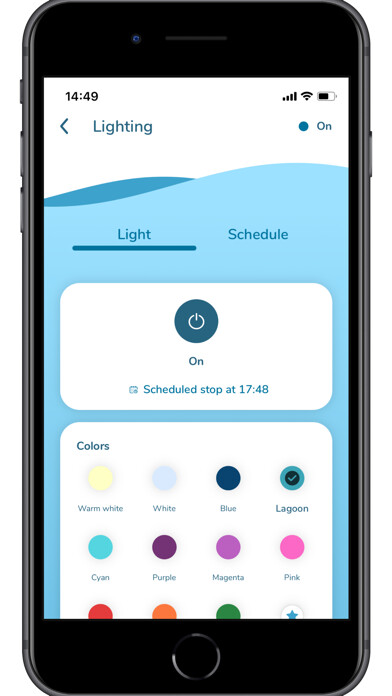
- Control of the lights with direct selection of the color (CCEI lights)
- Control of an auxiliary output (booster, treatment, heater, etc)
- Anti frost protection
- Weekend mode available for each function
- Remote upgrading of the app and the control unit
Together, lets enhance the control of your swimming pool! Thanks to the user-friendly interface, you can easily set your pool operations directly on your smartphone.
My interface was designed to allow a quick handling and many elements are customizable.
Set your preferences on my app and let me take care of the rest!
I adjust filtration time according to water temperature and I automatically switch your lights on at twilight! Fully enjoy your pool and let me take care of the constraints! With the tild app, monitor your pool with a WiFi or Bluetooth connection if WiFi does not reach the machine room.
You can go out on a weekend safely, I am now there to look after your pool thanks to my activable weekend mode and its specific filtration ranges to be set.
Included functions:
- Control of the filtration pump (thermoregulated, clock mode, ON, OFF)
- Control of the lights with direct selection of the color (CCEI lights)
- Control of an auxiliary output (booster, treatment, heater, etc)
- Anti frost protection
- Weekend mode available for each function
- Remote upgrading of the app and the control unit
MyAndroid is not a downloader online for tild. It only allows to test online tild with apkid com.ccei.tild. MyAndroid provides the official Google Play Store to run tild online.
