

We provide ByteEngine Translator online (apkid: com.byteengine.freetranslator) in order to run this application in our online Android emulator.
Description:
Run this app named ByteEngine Translator using MyAndroid.
You can do it using our Android online emulator.
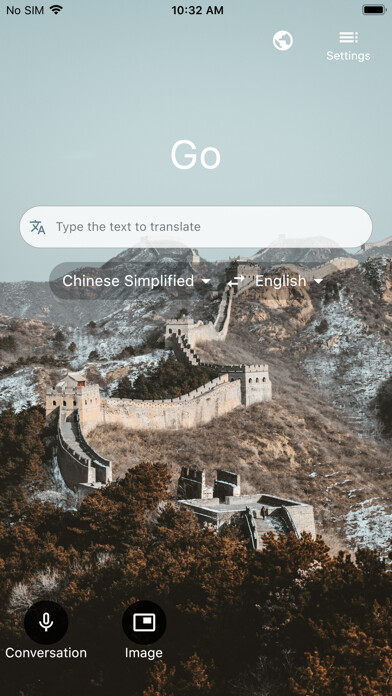
The Byte Engine Translator with PEIKO headset translates more than 100 languages, translating text, speech (for use in any app), conversations, camera photos and screenshots.
You can even download languages for free to translate offline and use when you travel
Voice translation to translate speech, which can be used in any app, by pasting it into any input box via the clipboard
Text translation into over 100 languages*, for online and offline use
Camera translation to translate text within photos and screenshots
Download languages for offline use for when you travel without an internet connection
Share your translations with other apps
Pin and save your most frequent translations for later
Translator supports the following languages: Afrikaans, Arabic, Bangla, Bosnian (Latin), Bulgarian, Cantonese (Traditional), Catalan, Chinese (Simplified), Chinese (Traditional), Croatian, Czech, Danish, Dutch, English, Estonian, Fijian, Filipino, Finnish, French, German, Greek, Haitian Creole, Hebrew, Hindi, Hmong Daw, Hungarian, Icelandic, Indonesian, Italian, Japanese, Kiswahili, Korean, Latvian, Lithuanian, Malagasy, Malay, Maltese, Norwegian, Persian, Polish, Portuguese, Quer'etaro Otomi, Romanian, Russian, Serbian (Cyrillic), Serbian (Latin), Slovak, Slovenian, Spanish, Swedish, Tahitian, Tamil, Telugu, Thai, Tongan, Turkish, Ukrainian, Urdu, Vietnamese, Welsh, and Yucatec Maya.
*Some features are not available in all languages.
// Request for User Permissions //
[Mandatory access]
1.
View Network access
To detect whether the device is on Wi-Fi, mobile data, or not connected to a network.
This helps the app know whether it should translate while online, or use an offline language pack.
2.
Network access
For access to Wi-Fi or mobile data to perform text or speech translations, and download offline language packs.
[Optional access]
1.
Camera
To take pictures for image translations, and to scan QR codes when joining a conversation.
2.
Microphone
To translate speech.
3.
Photos/Media/Files
To open photos from the device for image translation.
4.
Storage
To open photos from the device for image translation, and to save downloaded offline language packs.
You can even download languages for free to translate offline and use when you travel
Voice translation to translate speech, which can be used in any app, by pasting it into any input box via the clipboard
Text translation into over 100 languages*, for online and offline use
Camera translation to translate text within photos and screenshots
Download languages for offline use for when you travel without an internet connection
Share your translations with other apps
Pin and save your most frequent translations for later
Translator supports the following languages: Afrikaans, Arabic, Bangla, Bosnian (Latin), Bulgarian, Cantonese (Traditional), Catalan, Chinese (Simplified), Chinese (Traditional), Croatian, Czech, Danish, Dutch, English, Estonian, Fijian, Filipino, Finnish, French, German, Greek, Haitian Creole, Hebrew, Hindi, Hmong Daw, Hungarian, Icelandic, Indonesian, Italian, Japanese, Kiswahili, Korean, Latvian, Lithuanian, Malagasy, Malay, Maltese, Norwegian, Persian, Polish, Portuguese, Quer'etaro Otomi, Romanian, Russian, Serbian (Cyrillic), Serbian (Latin), Slovak, Slovenian, Spanish, Swedish, Tahitian, Tamil, Telugu, Thai, Tongan, Turkish, Ukrainian, Urdu, Vietnamese, Welsh, and Yucatec Maya.
*Some features are not available in all languages.
// Request for User Permissions //
[Mandatory access]
1.
View Network access
To detect whether the device is on Wi-Fi, mobile data, or not connected to a network.
This helps the app know whether it should translate while online, or use an offline language pack.
2.
Network access
For access to Wi-Fi or mobile data to perform text or speech translations, and download offline language packs.
[Optional access]
1.
Camera
To take pictures for image translations, and to scan QR codes when joining a conversation.
2.
Microphone
To translate speech.
3.
Photos/Media/Files
To open photos from the device for image translation.
4.
Storage
To open photos from the device for image translation, and to save downloaded offline language packs.
MyAndroid is not a downloader online for ByteEngine Translator. It only allows to test online ByteEngine Translator with apkid com.byteengine.freetranslator. MyAndroid provides the official Google Play Store to run ByteEngine Translator online.
