
We provide Hue Control online (apkid: com.beuzenberg.huecontrol) in order to run this application in our online Android emulator.
Description:
Run this app named Hue Control using MyAndroid.
You can do it using our Android online emulator.
Purpose
Addition to the Philips Hue App
Quick and easy control lights in the Control Notification and Quick Settings Tiles
Main features
Contol Notification to quickly control Philips Hue lights, even from your lock screen
Automate the notification: it will only be on your screen when you need it
Configure Quick Settings Tiles to quickly toggle lights, activate a scene or change colors
Connect to multiple bridges simultaneously
Create scenes that contain lights from multiple bridges
Powerful color picker
Pick colors from your favorite pictures and save them as scenes
Control Philips Hue Lights
Manage rooms, zones and scenes
More to come.
Control Notification
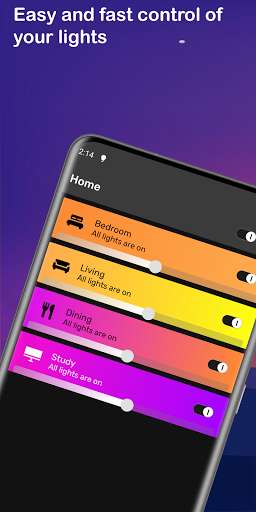
Control Philips Hue lights with greater ease and speed with the smart control notification.
This is available when a connection can be made with a Philips Hue Bridge and will disappear automatically when the connection is lost.
Switch lights on and off, choose a color or switch on a scene, all directly from the control notification.
Scenes
Use the powerful color picker to choose from millions of colors for your lights.
You can choose lights from different groups, zones and even from multiple bridges.
Multiple bridges
Hue Control lets you interact with multiple bridges at the same time.
You can already create scenes that contain lights from multiple bridges, and soon you'll also be able to do that for rooms.
Pro features
Control more than 2 groups in the notification.
Configureore than 2 Quick Settings Tiles
Requirements
Philips Hue Bridge
At least 1 Philips Hue Light bulb
WiFi connection (away from home connection will be added soon)
Addition to the Philips Hue App
Quick and easy control lights in the Control Notification and Quick Settings Tiles
Main features
Contol Notification to quickly control Philips Hue lights, even from your lock screen
Automate the notification: it will only be on your screen when you need it
Configure Quick Settings Tiles to quickly toggle lights, activate a scene or change colors
Connect to multiple bridges simultaneously
Create scenes that contain lights from multiple bridges
Powerful color picker
Pick colors from your favorite pictures and save them as scenes
Control Philips Hue Lights
Manage rooms, zones and scenes
More to come.
Control Notification
Control Philips Hue lights with greater ease and speed with the smart control notification.
This is available when a connection can be made with a Philips Hue Bridge and will disappear automatically when the connection is lost.
Switch lights on and off, choose a color or switch on a scene, all directly from the control notification.
Scenes
Use the powerful color picker to choose from millions of colors for your lights.
You can choose lights from different groups, zones and even from multiple bridges.
Multiple bridges
Hue Control lets you interact with multiple bridges at the same time.
You can already create scenes that contain lights from multiple bridges, and soon you'll also be able to do that for rooms.
Pro features
Control more than 2 groups in the notification.
Configureore than 2 Quick Settings Tiles
Requirements
Philips Hue Bridge
At least 1 Philips Hue Light bulb
WiFi connection (away from home connection will be added soon)
MyAndroid is not a downloader online for Hue Control. It only allows to test online Hue Control with apkid com.beuzenberg.huecontrol. MyAndroid provides the official Google Play Store to run Hue Control online.
