
We provide Assistive Touch for Android online (apkid: com.bentwice.assistivetouchpro) in order to run this application in our online Android emulator.
Description:
Run this app named Assistive Touch for Android using MyAndroid.
You can do it using our Android online emulator.
What is Assistive Touch?
Assistive Touch is an easy tool for Android devices.
It's fast, its smooth, and its totally FREE.
With a floating panel on the screen, you can easily use your Android smart phone.
More conveniently, you can quickly access to all your favorite apps, games, settings and quick toggle.
You can use smart clean function to clean running background apps, help your phone faster.
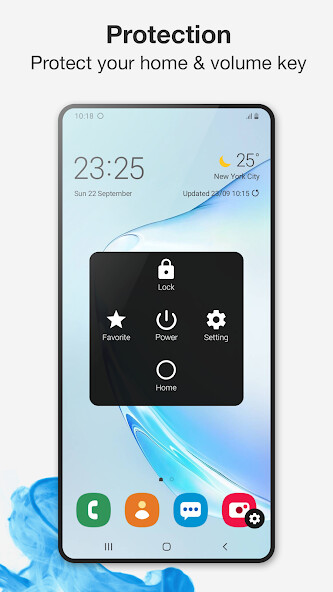
Assistive Touch is also an ideal app to protect the physical buttons (home button and volume button).
It is very useful for big screen smart phone.
Assistive Touch for Android
- Virtual Home button, easy touch to lock screen and open recent task
- Virtual Volume button, quick touch to change volume and change sound mode
- Virtual Back button
- Clean ram, boost speed, one tap ram booster.
- Easy touch to open your favorite application
- Go to all setting very quick with a touch
Quick touch setting include:
-Capture Screenshot (5.0 and up)
Power popup (5.0 and up)
Open Notification
WiFi
Bluetooth
Location (GPS)
Ring mode (Normal mode, Vibrate mode, Silent mode)
Screen rotation
Volume up & down
Airplane mode
Flashlight Bright
Launch all applications or games on your device
Ram Booster - Clean Memory
Boost your phone, free up memory (RAM), speed up your device and save battery.
Our 1 Tap Boost make it easy to optimize directly from your home screen.
This is a fast and use full booster feature to clear unnecessary apps running background, smart clean ram memory.
Screen Recorder
- Screen Recorder is the best function to record the screen of your Lollipop.
It does NOT require root access, no time limit, no watermark, ad free and very easy to use with one action to start and stop recording.
- Screen recorder lets you record your screen to HD and FullHD videos.
You can also record audio from the mic and it is automatically muxed into the videos.
That makes it very convenient to create tutorial, promotional video, comment about your game and gameplay or record Video chat.
Dark Mode
- It saves battery, mainly if the device uses an OLED or AMOLED screen.
- While the dark text on a white background is the best in terms of readability, Dark Mode is better for reducing eye strain in low light conditions.
With the majority of the screen dark, the screen glare is reduced, thereby minimizing flickering and blue light.
Customize
- You can change color of background with your favorite color
- You can change icon of Assistive Touch easy with many pretty icon, totally free
- Gesture Setting for Floating Button (One tap, double tap, long press)
Assistive Touch is an easy tool for Android devices.
It's fast, its smooth, and its totally FREE.
With a floating panel on the screen, you can easily use your Android smart phone.
More conveniently, you can quickly access to all your favorite apps, games, settings and quick toggle.
You can use smart clean function to clean running background apps, help your phone faster.
Assistive Touch is also an ideal app to protect the physical buttons (home button and volume button).
It is very useful for big screen smart phone.
Assistive Touch for Android
- Virtual Home button, easy touch to lock screen and open recent task
- Virtual Volume button, quick touch to change volume and change sound mode
- Virtual Back button
- Clean ram, boost speed, one tap ram booster.
- Easy touch to open your favorite application
- Go to all setting very quick with a touch
Quick touch setting include:
-Capture Screenshot (5.0 and up)
Power popup (5.0 and up)
Open Notification
WiFi
Bluetooth
Location (GPS)
Ring mode (Normal mode, Vibrate mode, Silent mode)
Screen rotation
Volume up & down
Airplane mode
Flashlight Bright
Launch all applications or games on your device
Ram Booster - Clean Memory
Boost your phone, free up memory (RAM), speed up your device and save battery.
Our 1 Tap Boost make it easy to optimize directly from your home screen.
This is a fast and use full booster feature to clear unnecessary apps running background, smart clean ram memory.
Screen Recorder
- Screen Recorder is the best function to record the screen of your Lollipop.
It does NOT require root access, no time limit, no watermark, ad free and very easy to use with one action to start and stop recording.
- Screen recorder lets you record your screen to HD and FullHD videos.
You can also record audio from the mic and it is automatically muxed into the videos.
That makes it very convenient to create tutorial, promotional video, comment about your game and gameplay or record Video chat.
Dark Mode
- It saves battery, mainly if the device uses an OLED or AMOLED screen.
- While the dark text on a white background is the best in terms of readability, Dark Mode is better for reducing eye strain in low light conditions.
With the majority of the screen dark, the screen glare is reduced, thereby minimizing flickering and blue light.
Customize
- You can change color of background with your favorite color
- You can change icon of Assistive Touch easy with many pretty icon, totally free
- Gesture Setting for Floating Button (One tap, double tap, long press)
MyAndroid is not a downloader online for Assistive Touch for Android. It only allows to test online Assistive Touch for Android with apkid com.bentwice.assistivetouchpro. MyAndroid provides the official Google Play Store to run Assistive Touch for Android online.
