

We provide Pastel Board online (apkid: com.bawender.creations.pastel.board) in order to run this application in our online Android emulator.
Description:
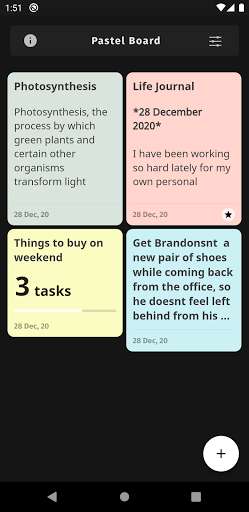
Run this app named Pastel Board using MyAndroid.
You can do it using our Android online emulator.
Note-taking will never be boring again now with the Pastel board.
Use eye-soothing pastel colors to take notes upon and create to-do's.
You can share your notes as plain texts to other applications and also duplicate your notes and todo's for quick editing.
* Add Notes/Todo's
Add notes by quickly typing into the title which allows bold type text to be seen on the listing screen.
This is useful for simple notes.
For more complex type notes where you might need sections and headings.
Write the notes in the description section.
The description section allows text formatting.
Pastel board loves keeping things simple and hence the formatting is inspired by the markdown language.
Available formatting options:
1.
BOLD - surround a text between two asterisks.
Eq *I am bold*
2.
ITALICS - surround a text between two underscores.
Eq _I am italics_
You can also create a to-do type note and add numerous to-do tasks in it and check them off as and when you are done with them.
* Choose colors
At any given point you can choose colors from the color palette and customize the notes to the pleasing of your eyes.
* Other features
Sort or find a note of a specific type.
We have a filter screen from which you can sort the contents on the listing screen for easier access.
More features coming ahead in future releases.
Use eye-soothing pastel colors to take notes upon and create to-do's.
You can share your notes as plain texts to other applications and also duplicate your notes and todo's for quick editing.
* Add Notes/Todo's
Add notes by quickly typing into the title which allows bold type text to be seen on the listing screen.
This is useful for simple notes.
For more complex type notes where you might need sections and headings.
Write the notes in the description section.
The description section allows text formatting.
Pastel board loves keeping things simple and hence the formatting is inspired by the markdown language.
Available formatting options:
1.
BOLD - surround a text between two asterisks.
Eq *I am bold*
2.
ITALICS - surround a text between two underscores.
Eq _I am italics_
You can also create a to-do type note and add numerous to-do tasks in it and check them off as and when you are done with them.
* Choose colors
At any given point you can choose colors from the color palette and customize the notes to the pleasing of your eyes.
* Other features
Sort or find a note of a specific type.
We have a filter screen from which you can sort the contents on the listing screen for easier access.
More features coming ahead in future releases.
MyAndroid is not a downloader online for Pastel Board. It only allows to test online Pastel Board with apkid com.bawender.creations.pastel.board. MyAndroid provides the official Google Play Store to run Pastel Board online.
