

We provide Lemon Video Player - No Ads online (apkid: com.avrapps.video.player) in order to run this application in our online Android emulator.
Description:
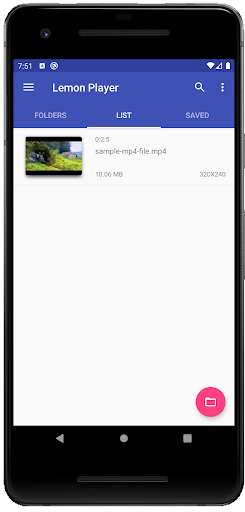
Run this app named Lemon Video Player - No Ads using MyAndroid.
You can do it using our Android online emulator.
Best Android Video player with clean UI with no ads and hidden permissionss.
It uses ExoPlayer's ffmpeg extentsion with all its audio formats enabled (it can handle even special formats like AC3, EAC3, DTS, DTS HD, TrueHD etc.).
It syncs audio with the Video track when using Bluetooth earphones/speaker.
Supported formats
* Audio: Vorbis, Opus, FLAC, ALAC, PCM/WAVE (-law, A-law), MP1, MP2, MP3, AMR (NB, WB), AAC (LC, ELD, HE; xHE on Android 9+), AC-3, E-AC-3, DTS, DTS-HD, TrueHD
* Video: H.263, H.264 AVC (Baseline Profile; Main Profile on Android 6+), H.265 HEVC, MPEG-4 SP, VP8, VP9, AV1
* Containers: MP4, MOV, WebM, MKV, Ogg, MPEG-TS, MPEG-PS, FLV
* Streaming: DASH, HLS, SmoothStreaming, RTSP
* Subtitles: SRT, SSA, TTML, VTT
HDR (HDR10+ and Dolby Vision) Video playback on compatible/supported hardware.
Features
* Audio/subtitle track selection
* Playback speed control
* Horizontal swipe and double tap to quickly seek
* Vertical swipe to change brightness (left) / volume (right)
* Pinch to zoom (Android 7+)
* PiP (Picture in Picture) on Android 8+ (resizable on Android 11+)
* Resize (fit/crop)
* Volume boost
* Auto frame rate matching on Android TV/boxes (Android 6+)
* Post-playback actions (delete file/skip to next)
* Touch lock (long tap)
* No ads, tracking or excessive permissions
To load external (non-embedded) subtitles, press the folder icon in the bottom menu.
The first time you do that, you will be offered to select root Video folder to enable automatic loading of external subtitles.
It uses ExoPlayer's ffmpeg extentsion with all its audio formats enabled (it can handle even special formats like AC3, EAC3, DTS, DTS HD, TrueHD etc.).
It syncs audio with the Video track when using Bluetooth earphones/speaker.
Supported formats
* Audio: Vorbis, Opus, FLAC, ALAC, PCM/WAVE (-law, A-law), MP1, MP2, MP3, AMR (NB, WB), AAC (LC, ELD, HE; xHE on Android 9+), AC-3, E-AC-3, DTS, DTS-HD, TrueHD
* Video: H.263, H.264 AVC (Baseline Profile; Main Profile on Android 6+), H.265 HEVC, MPEG-4 SP, VP8, VP9, AV1
* Containers: MP4, MOV, WebM, MKV, Ogg, MPEG-TS, MPEG-PS, FLV
* Streaming: DASH, HLS, SmoothStreaming, RTSP
* Subtitles: SRT, SSA, TTML, VTT
HDR (HDR10+ and Dolby Vision) Video playback on compatible/supported hardware.
Features
* Audio/subtitle track selection
* Playback speed control
* Horizontal swipe and double tap to quickly seek
* Vertical swipe to change brightness (left) / volume (right)
* Pinch to zoom (Android 7+)
* PiP (Picture in Picture) on Android 8+ (resizable on Android 11+)
* Resize (fit/crop)
* Volume boost
* Auto frame rate matching on Android TV/boxes (Android 6+)
* Post-playback actions (delete file/skip to next)
* Touch lock (long tap)
* No ads, tracking or excessive permissions
To load external (non-embedded) subtitles, press the folder icon in the bottom menu.
The first time you do that, you will be offered to select root Video folder to enable automatic loading of external subtitles.
MyAndroid is not a downloader online for Lemon Video Player - No Ads. It only allows to test online Lemon Video Player - No Ads with apkid com.avrapps.video.player. MyAndroid provides the official Google Play Store to run Lemon Video Player - No Ads online.
