

We provide Messecure(Text encryption App) online (apkid: com.aufthesis.encryption) in order to run this application in our online Android emulator.
Description:
Run this app named Messecure(Text encryption App) using MyAndroid.
You can do it using our Android online emulator.
A person who has a secret is an essential item!
It is a very simple text encryption tool (cryptogram creation) tool.
It is very safe because it applies a password (key) to each ciphertext with a super strong encryption algorithm.
Background
Even in applications that are used conveniently by smartphones etc., accounts are easily hijacked, the contents are stolen and valuable information leaks and it is an era that is becoming a social problem.
If not, it would be better to think about the exchange of messages via the Internet on the premise that everything is seen.
Why do not you take measures to protect yourself by yourself soon?
After the information that I want to keep secret has leaked to the outside, it can not be recovered any more.
How to use
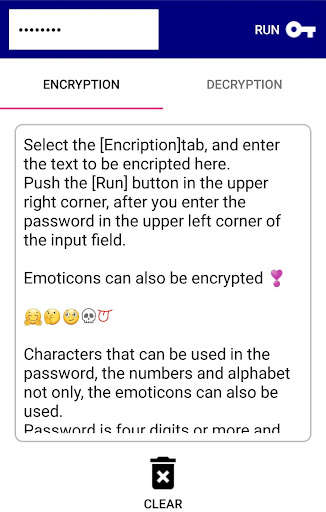
In the entry field on the "Encryption" tab, enter the text you want to keep secret (no limit of number of characters)
When entering a password in the entry field at the upper left of the screen and pressing the "execute" button at the upper right of the screen
Encrypted characters (ciphertext) are displayed.
In the case of
Paste the ciphertext in the input field of "Decryption" tab,
When entering a password in the entry field at the upper left of the screen and pressing the "Run" button at the upper right of the screen
The decrypted message (plane text) is displayed.
* Naturally, it can not be decrypted unless the password (key) multiplied by the ciphertext matches
Please do not forget the password of the encrypted key
Even if a password is known by any chance, of course it can only be deciphered with this application
(Well it's impossible to say absolutely, so if you take a Brute force attack etc, it will be decoded in a few years .)
The number of characters to put in the password is 4 to 16 characters (one pictogram is counted as 4 characters).
You can use numbers, English, double-byte characters, symbols or pictograms all together.
In the case of
Encrypted ciphertext or decrypted message can be shared with others (by LINE, mail, etc.).
You can also send and decrypt ciphertexts received by other applications such as LINE to this application.
* When sharing cipher text with other people, I think that it is better to share the password (common key) with other routes (letters, telephone, sign language, Morse code, etc.) for safety.
For example it may be useful for
For people who want to exchange secrets of only two people who do not want to be seen by anyone
Let's share only two people's ciphertext with a message application such as LINE or Messenger
To those who want to lock a diary of yourself who you do not want to see
Record your own ciphertext in notebook applications such as Evernote or OneNote
For those who need to protect confidential information only within the company
Share ciphertexts only within teams within the group of message applications
Business people with a high awareness of information security
Apply this app and highlight your high consciousness around you
The descendant of the ninja
Do not forget the spirit of shinobi
For spy apprentices
Keep your duties to top secret.
to wish a success!
Features of this application
The encryption algorithm adopts AES-256bit CBC mode
We are eliminating useless title screen so that you can use the application immediately
You can also input voice messages
When encrypting the message, the original message will automatically disappear
All languages that can be handled by computers can be encrypted ( decrypted) (probably)
Encrypted sentences encrypted with this application can be shared and sent to other applications
Since there is no message transmission / reception function in this application itself at this time, please use other applications to utilize
At this time, only text (letters) is subject to encryption with this application
At the moment, encryption of files such as images is not supported
It is a very simple text encryption tool (cryptogram creation) tool.
It is very safe because it applies a password (key) to each ciphertext with a super strong encryption algorithm.
Background
Even in applications that are used conveniently by smartphones etc., accounts are easily hijacked, the contents are stolen and valuable information leaks and it is an era that is becoming a social problem.
If not, it would be better to think about the exchange of messages via the Internet on the premise that everything is seen.
Why do not you take measures to protect yourself by yourself soon?
After the information that I want to keep secret has leaked to the outside, it can not be recovered any more.
How to use
In the entry field on the "Encryption" tab, enter the text you want to keep secret (no limit of number of characters)
When entering a password in the entry field at the upper left of the screen and pressing the "execute" button at the upper right of the screen
Encrypted characters (ciphertext) are displayed.
In the case of
Paste the ciphertext in the input field of "Decryption" tab,
When entering a password in the entry field at the upper left of the screen and pressing the "Run" button at the upper right of the screen
The decrypted message (plane text) is displayed.
* Naturally, it can not be decrypted unless the password (key) multiplied by the ciphertext matches
Please do not forget the password of the encrypted key
Even if a password is known by any chance, of course it can only be deciphered with this application
(Well it's impossible to say absolutely, so if you take a Brute force attack etc, it will be decoded in a few years .)
The number of characters to put in the password is 4 to 16 characters (one pictogram is counted as 4 characters).
You can use numbers, English, double-byte characters, symbols or pictograms all together.
In the case of
Encrypted ciphertext or decrypted message can be shared with others (by LINE, mail, etc.).
You can also send and decrypt ciphertexts received by other applications such as LINE to this application.
* When sharing cipher text with other people, I think that it is better to share the password (common key) with other routes (letters, telephone, sign language, Morse code, etc.) for safety.
For example it may be useful for
For people who want to exchange secrets of only two people who do not want to be seen by anyone
Let's share only two people's ciphertext with a message application such as LINE or Messenger
To those who want to lock a diary of yourself who you do not want to see
Record your own ciphertext in notebook applications such as Evernote or OneNote
For those who need to protect confidential information only within the company
Share ciphertexts only within teams within the group of message applications
Business people with a high awareness of information security
Apply this app and highlight your high consciousness around you
The descendant of the ninja
Do not forget the spirit of shinobi
For spy apprentices
Keep your duties to top secret.
to wish a success!
Features of this application
The encryption algorithm adopts AES-256bit CBC mode
We are eliminating useless title screen so that you can use the application immediately
You can also input voice messages
When encrypting the message, the original message will automatically disappear
All languages that can be handled by computers can be encrypted ( decrypted) (probably)
Encrypted sentences encrypted with this application can be shared and sent to other applications
Since there is no message transmission / reception function in this application itself at this time, please use other applications to utilize
At this time, only text (letters) is subject to encryption with this application
At the moment, encryption of files such as images is not supported
MyAndroid is not a downloader online for Messecure(Text encryption App). It only allows to test online Messecure(Text encryption App) with apkid com.aufthesis.encryption. MyAndroid provides the official Google Play Store to run Messecure(Text encryption App) online.
