

We provide AV Screen Recorder online (apkid: com.arytan.screenrecorder) in order to run this application in our online Android emulator.
Description:
Run this app named AV Screen Recorder using MyAndroid.
You can do it using our Android online emulator.
AV Screen Recorder helps you to record smooth & clear screen videos and screenshots in the easiest way.
You can record HD videos, gameplay, Video calls, and online lectures with No recording time limits, No watermark, and No lag.
Features:
Capture smooth and clear screen videos and screenshots
Screen record with overlay facecam
Brush tool to draw on the screen
High-Quality Video: 1080p, 12Mbps, 60FPS
Share your recordings with your friends
Support portrait, landscape, and auto screen recording mode
Record gameplay
Support internal audio recording for Android 10 and above
Video editor with trim and compressing Video features
No watermark on recorded Video and screenshots
No recording time limits & No root needed
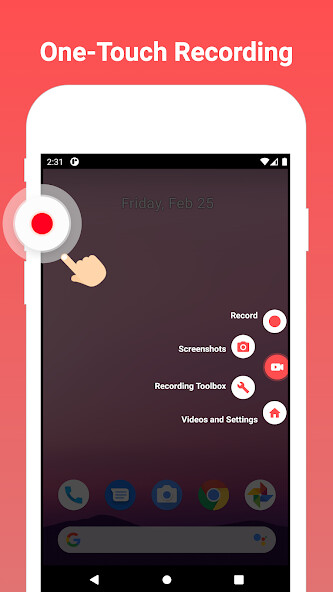
Access important features with floating control
Supporting pause and resume features for Video record
Full HD Video
You can record game & high quality videos with adjustable resolution(240p to 1080p), and FPS(25FPS to 60FPS).
Video Editor
Video trim and Video compress features are provided.
This makes your videos compact and smaller in size so that you can share them easily with your friends.
Watermark
You can record videos with or without a watermark.
Custom settings are provided to create a new watermark text, size, and color.
Record with Facecam
Records your phone screen and camera simultaneously.
You can adjust the overlay window size and it is draggable to any position on the screen.
Brush Tool
Touch screen to draw, you can draw a symbol or marks on the screen when recording or screenshot.
High-Quality Audio
It records crystal clear audio during gameplay, Video calls, and online lectures.
From Android 10 and above internal audio recording is supported.
No Time Limit
Screen recorder helps you to record continuous videos with no time limits.
If you are a game recorder, you can record all your live gameplay without interruption.
Note:
To prevent screen recording interruption, check your phone's battery saver doesn't restrict the app's activity.
Internal sound recording is only available for Android 10 and above.
Be mindful that two applications can't use the microphone simultaneously.
If another app is using the microphone, recorded videos in AV Screen Recorder will be muted.
Disclaimer:
AV Screen Recorder is not affiliated with any social media platforms.
Users shall be solely responsible for any intellectual property infringement arising from the screen recording.
We respect the copyright of the owners.
Please confirm that you have obtained the owners' permission or authorization before using this application for recording.
You can record HD videos, gameplay, Video calls, and online lectures with No recording time limits, No watermark, and No lag.
Features:
Capture smooth and clear screen videos and screenshots
Screen record with overlay facecam
Brush tool to draw on the screen
High-Quality Video: 1080p, 12Mbps, 60FPS
Share your recordings with your friends
Support portrait, landscape, and auto screen recording mode
Record gameplay
Support internal audio recording for Android 10 and above
Video editor with trim and compressing Video features
No watermark on recorded Video and screenshots
No recording time limits & No root needed
Access important features with floating control
Supporting pause and resume features for Video record
Full HD Video
You can record game & high quality videos with adjustable resolution(240p to 1080p), and FPS(25FPS to 60FPS).
Video Editor
Video trim and Video compress features are provided.
This makes your videos compact and smaller in size so that you can share them easily with your friends.
Watermark
You can record videos with or without a watermark.
Custom settings are provided to create a new watermark text, size, and color.
Record with Facecam
Records your phone screen and camera simultaneously.
You can adjust the overlay window size and it is draggable to any position on the screen.
Brush Tool
Touch screen to draw, you can draw a symbol or marks on the screen when recording or screenshot.
High-Quality Audio
It records crystal clear audio during gameplay, Video calls, and online lectures.
From Android 10 and above internal audio recording is supported.
No Time Limit
Screen recorder helps you to record continuous videos with no time limits.
If you are a game recorder, you can record all your live gameplay without interruption.
Note:
To prevent screen recording interruption, check your phone's battery saver doesn't restrict the app's activity.
Internal sound recording is only available for Android 10 and above.
Be mindful that two applications can't use the microphone simultaneously.
If another app is using the microphone, recorded videos in AV Screen Recorder will be muted.
Disclaimer:
AV Screen Recorder is not affiliated with any social media platforms.
Users shall be solely responsible for any intellectual property infringement arising from the screen recording.
We respect the copyright of the owners.
Please confirm that you have obtained the owners' permission or authorization before using this application for recording.
MyAndroid is not a downloader online for AV Screen Recorder. It only allows to test online AV Screen Recorder with apkid com.arytan.screenrecorder. MyAndroid provides the official Google Play Store to run AV Screen Recorder online.
