
We provide Arrivals online (apkid: com.appspot.arrivals2020.app) in order to run this application in our online Android emulator.
Description:
Run this app named Arrivals using MyAndroid.
You can do it using our Android online emulator.
The app:
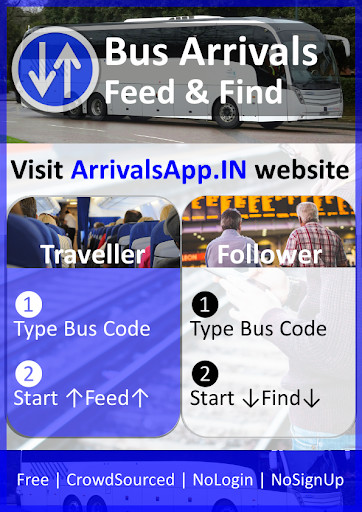
Solution to the most dreaded situation of wondering - Where has it reached?
Use it for Airway, Roadway, Railway, Waterway or even Space travel (as far as location & network service is coverd)
Feed public transport route location for community to Find its Arrivals
Find public transport route location based on community fed Arrivals
On the Home-screen: (start from this screen to enter route-name)
Type a route name between 4 to 12 alpha-numeric characters in length (do not enter personal information / names)
Tap on Find or Feed to get started
App will navigate to respective Find or Feed screen
On the Find-screen: (start from Home-screen to enter route-name)
From the list of routes, tap on button to select the route and Find its Arrivals
Tap button, to enable (green) or disable (red) the Find updates
Tip: Toggling button disable-enable-disable will get one update and keep future updates disabled
Tap button, to set in-app local-notification alert for current route
If alert is set successfully, app will navigate to More-screen showing added alert-row and allowing user to re-configure it
Tap on trailing route-pin (hop) to select it and display location at that time
On the Feed-screen: (start from Home-screen to enter route-name)
Tap button, to enable (green) or disable (red) the Feed updates
Tip: Toggling button disable-enable-disable will send one update and keep future updates disabled
Tap button, to open native email composer and share the link to this Feed
Tap 1 button, to cycle through Feed update-frequency in minutes
Tap on trailing route-pin (hop) to select it and display location at that time
IMPORTANT: To keep the Feed active in background, tap on device-home-button or switch to other app.
The active Feed may stop, if device-back-button is tapped to close the Arrivals app.
On the More-screen: (first use Find-screen or Feed-screen)
Access and manage Alerts, Recent-Feed and Recent-Find from here
Tap button, to delete a particular row on this screen
Tap 1km button, to cycle through range options for alert
Tap button, to start corresponding Find
Tap button, to start corresponding Feed
Next time user re-launches the app, access Recent-Feed or Recent-Find routes for quick one-tap Find or Feed from this More-screen
Optionally access device-settings and clear app cache to remove all cached Alerts, Recent-Feed and Recent-Find
Note 1: This is quick, easy and compact app to Feed & Find Arrivals.
Route information may not be reliable and is fed by community.
Route trail is available only for recent few hops.
Routes are regularly disabled or removed from server after several hours.
Infrastructure hosting server may not be reliable always; retry after 24 hours.
Enhancements & new-features along with bug-fixes are always work-in-progress; keep the app updated.
User discretion is strongly recommended for this as-is app.
Note 2: This app may use cache, session, cookies and analytics.
This app may use 3rd party software in parts or whole.
This app is available as-is, without warranty of any kind.
In no event shall the authors, copyright holders or provider be liable for any claim, damages or other liability.
Interstitial Ads disclosure: This app may display interstitial Ads.
In app version 1.0.1, interstitial ads may appear only once after every-launch of this app and then for every access of More-screen (additional features).
Interstitial ads are not expected to appear for subsequent access of primary features from Home-screen, Find-screen and Feed-screen.
Appearance of ads may change without requiring disclosure update.
Copyright 2014 All rights reserved.
Solution to the most dreaded situation of wondering - Where has it reached?
Use it for Airway, Roadway, Railway, Waterway or even Space travel (as far as location & network service is coverd)
Feed public transport route location for community to Find its Arrivals
Find public transport route location based on community fed Arrivals
On the Home-screen: (start from this screen to enter route-name)
Type a route name between 4 to 12 alpha-numeric characters in length (do not enter personal information / names)
Tap on Find or Feed to get started
App will navigate to respective Find or Feed screen
On the Find-screen: (start from Home-screen to enter route-name)
From the list of routes, tap on button to select the route and Find its Arrivals
Tap button, to enable (green) or disable (red) the Find updates
Tip: Toggling button disable-enable-disable will get one update and keep future updates disabled
Tap button, to set in-app local-notification alert for current route
If alert is set successfully, app will navigate to More-screen showing added alert-row and allowing user to re-configure it
Tap on trailing route-pin (hop) to select it and display location at that time
On the Feed-screen: (start from Home-screen to enter route-name)
Tap button, to enable (green) or disable (red) the Feed updates
Tip: Toggling button disable-enable-disable will send one update and keep future updates disabled
Tap button, to open native email composer and share the link to this Feed
Tap 1 button, to cycle through Feed update-frequency in minutes
Tap on trailing route-pin (hop) to select it and display location at that time
IMPORTANT: To keep the Feed active in background, tap on device-home-button or switch to other app.
The active Feed may stop, if device-back-button is tapped to close the Arrivals app.
On the More-screen: (first use Find-screen or Feed-screen)
Access and manage Alerts, Recent-Feed and Recent-Find from here
Tap button, to delete a particular row on this screen
Tap 1km button, to cycle through range options for alert
Tap button, to start corresponding Find
Tap button, to start corresponding Feed
Next time user re-launches the app, access Recent-Feed or Recent-Find routes for quick one-tap Find or Feed from this More-screen
Optionally access device-settings and clear app cache to remove all cached Alerts, Recent-Feed and Recent-Find
Note 1: This is quick, easy and compact app to Feed & Find Arrivals.
Route information may not be reliable and is fed by community.
Route trail is available only for recent few hops.
Routes are regularly disabled or removed from server after several hours.
Infrastructure hosting server may not be reliable always; retry after 24 hours.
Enhancements & new-features along with bug-fixes are always work-in-progress; keep the app updated.
User discretion is strongly recommended for this as-is app.
Note 2: This app may use cache, session, cookies and analytics.
This app may use 3rd party software in parts or whole.
This app is available as-is, without warranty of any kind.
In no event shall the authors, copyright holders or provider be liable for any claim, damages or other liability.
Interstitial Ads disclosure: This app may display interstitial Ads.
In app version 1.0.1, interstitial ads may appear only once after every-launch of this app and then for every access of More-screen (additional features).
Interstitial ads are not expected to appear for subsequent access of primary features from Home-screen, Find-screen and Feed-screen.
Appearance of ads may change without requiring disclosure update.
Copyright 2014 All rights reserved.
MyAndroid is not a downloader online for Arrivals. It only allows to test online Arrivals with apkid com.appspot.arrivals2020.app. MyAndroid provides the official Google Play Store to run Arrivals online.
