

We provide Book your ticket online online (apkid: com.albon.myfastcat) in order to run this application in our online Android emulator.
Description:
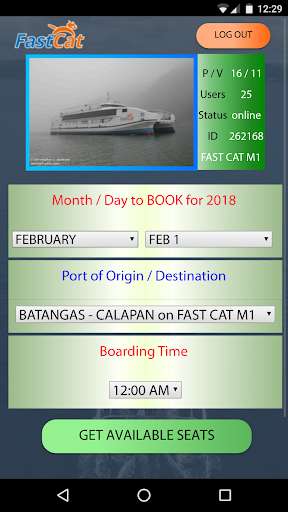
Run this app named Book your ticket online using MyAndroid.
You can do it using our Android online emulator.
Online booking.
1) Mag sign up gamit ng iyong pangalan, GSM number or email address at pumili ng password mga 8 characters pataas.
2) Mag login.
Mamili ng oras kung kailan ka sasakay.
3) Piliin kung saan ka mang gagaling at kung saan ka pupunta.
4) Piliin ang oras kung kailan ang iyon biyahe (Boarding time)
5) Click GET AVAILABLE SEATS.
Select one of the white box with dot to make it blue.
6) Select one of Ticket class Economy / Premium / Business or CAR.
7) Select one of the Classification Ticket FARE cost.
Scroll down, select one of the green/yellow button where you want to seat
8) A new redish button w/ label "Book selection on Year-MM-DD hh: mm" will appear.
Use it to confirm your selection.
9) You can book 1 to 7 tickets even for your CAR.
10) To delete entry, just click the white box below your selection.
11) Kung okay na, click the redish button.
Input your password to book.
12) You will get notification for successful booking.
Instruction included how to pay and claim your ticket(s).
1) Mag sign up gamit ng iyong pangalan, GSM number or email address at pumili ng password mga 8 characters pataas.
2) Mag login.
Mamili ng oras kung kailan ka sasakay.
3) Piliin kung saan ka mang gagaling at kung saan ka pupunta.
4) Piliin ang oras kung kailan ang iyon biyahe (Boarding time)
5) Click GET AVAILABLE SEATS.
Select one of the white box with dot to make it blue.
6) Select one of Ticket class Economy / Premium / Business or CAR.
7) Select one of the Classification Ticket FARE cost.
Scroll down, select one of the green/yellow button where you want to seat
8) A new redish button w/ label "Book selection on Year-MM-DD hh: mm" will appear.
Use it to confirm your selection.
9) You can book 1 to 7 tickets even for your CAR.
10) To delete entry, just click the white box below your selection.
11) Kung okay na, click the redish button.
Input your password to book.
12) You will get notification for successful booking.
Instruction included how to pay and claim your ticket(s).
MyAndroid is not a downloader online for Book your ticket online. It only allows to test online Book your ticket online with apkid com.albon.myfastcat. MyAndroid provides the official Google Play Store to run Book your ticket online online.
