
We provide MyCounter - Everything Counter online (apkid: com.albert.mycounter) in order to run this application in our online Android emulator.
Description:
Run this app named MyCounter - Everything Counter using MyAndroid.
You can do it using our Android online emulator.
This is a beautiful counter that is available in different color styles.
It helps you keep track of anything you need to count.
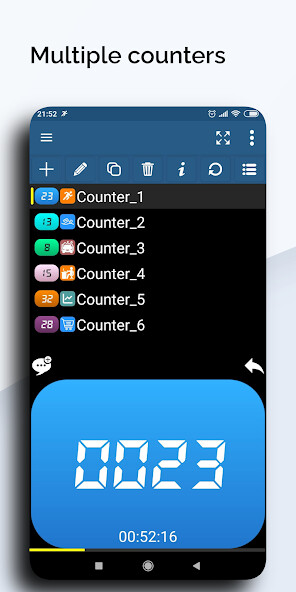
It's easy to switch quickly, choose your photos as icons, show multiple count values in the status bar, or attach notes to each value.
Key Features
Multiple counters with styles and icons
Multiple speech modes
Easily reverting the count value
Target value - It will stop and alarm you when it arrives
Deadline - Once the time is up, it will stop counting
Interval reminder
Keeping fixed notification with count info
History can be attached with notes
Backup & Recovery - Cloud (Google Drive) or local
Multiple theme colors
Statistics, charts and more features
Notes
The application structure adopts offline mode, no server, and the main data is stored on the user device.
If you need to reinstall the application or replace the device (or share data with multiple devices), please make sure to back up and restore the data yourself.
Please update the application to the latest version before performing "Recovery".
Because some functions (such as cloud backup, feedback, advertisement display) require internet connection, so users who newly install the app from today (2021-4-10) will not be able to use while it is closed.
Ad Description
Banner Ads: Display at the bottom of most pages.
Interstitial Ads: Every 6~8 minutes of usage time, it will be displayed when switching pages or rotating the screen, the operation process will not be disturbed when only counting.
The content and volume control, and the closing steps are determined by the third-party platform.
You can use the app without VIP in normal cases, but if you don't want any ad, please consider buying.
It helps you keep track of anything you need to count.
It's easy to switch quickly, choose your photos as icons, show multiple count values in the status bar, or attach notes to each value.
Key Features
Multiple counters with styles and icons
Multiple speech modes
Easily reverting the count value
Target value - It will stop and alarm you when it arrives
Deadline - Once the time is up, it will stop counting
Interval reminder
Keeping fixed notification with count info
History can be attached with notes
Backup & Recovery - Cloud (Google Drive) or local
Multiple theme colors
Statistics, charts and more features
Notes
The application structure adopts offline mode, no server, and the main data is stored on the user device.
If you need to reinstall the application or replace the device (or share data with multiple devices), please make sure to back up and restore the data yourself.
Please update the application to the latest version before performing "Recovery".
Because some functions (such as cloud backup, feedback, advertisement display) require internet connection, so users who newly install the app from today (2021-4-10) will not be able to use while it is closed.
Ad Description
Banner Ads: Display at the bottom of most pages.
Interstitial Ads: Every 6~8 minutes of usage time, it will be displayed when switching pages or rotating the screen, the operation process will not be disturbed when only counting.
The content and volume control, and the closing steps are determined by the third-party platform.
You can use the app without VIP in normal cases, but if you don't want any ad, please consider buying.
MyAndroid is not a downloader online for MyCounter - Everything Counter. It only allows to test online MyCounter - Everything Counter with apkid com.albert.mycounter. MyAndroid provides the official Google Play Store to run MyCounter - Everything Counter online.
