
We provide Plan N Dive online (apkid: com.aixsonic.serenity) in order to run this application in our online Android emulator.
Description:
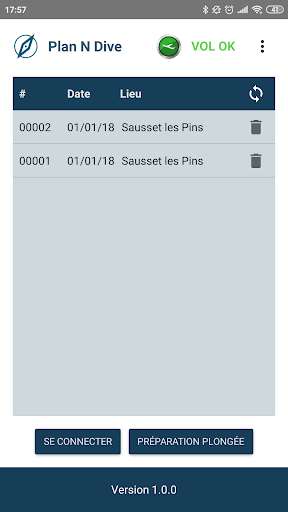
Run this app named Plan N Dive using MyAndroid.
You can do it using our Android online emulator.
This app has been designed for you as a diver!
This space is yours, here you can:
\tPrepare your dives (and share them with your diving team)
\tView your dives / retrieve the profiles
\tUpdate your SERENITY
\tAdd modes (if your SERENITY does not have the 3)
But before this, let's take a few minutes to configure your SERENITY!
The first time you use it, go to the menu, go to the settings and enter the following information:
\tSurname
\tForename
\tThe telephone number of the person to be informed in case of emergency (ICE).
\tDate
\tTime
1.\tCONFIGURE YOUR DIVES
The SERENITY CONCEPT app will let you save all the settings required to plan your dive in the best way possible.
If your SERENITY CONCEPT computer has:
-\tDepth gauge mode (Lrins) just enter the 5 fields:
Maximum depth
Diving time
Number of stages
Stop depth
Stop duration
With this information, your SERENITY will indicate the stops.
If your SERENITY CONCEPT computer has:
-\tDecompression algorithm (Frioul) you must enter:
Oxygen
PPO2
Algorithm security (3 levels)
Ascent speed
With this information, your SERENITY will calculate the stops for you.
1-1\tSharing your dive planning
Before taking the plunge you can share (over a Bluetooth connection) your dive plan with your diving partner or team.
Once the data is transferred to the SERENITY
-\tIf you are sending the data: you must go to transmit mode on the SERENITY screen
-\tIf you are receiving the data: you must go to recep mode on the SERENITY screen
2.\tVIEW YOUR DIVES
Once you get back up to the surface, this app enables you to view and analyse your dive.
From your SERENITY you can access the dive call-back screen indicating the max depth and the dive duration.
From the app on your phone you can access 3 screens:
General information
The dive profile
The dive speed
3.\tUPDATES
A second app (SERENITY UP) must be downloaded to keep the SERENITY software up-to-date.
You will be offered updates that you can download for free.
4.\tADDING MODES
Would you like one or two additional options?
You can get them from our website: www.serenityconcept.com you will be directed to the SERENITY Up app.
5.\tNOTIFICATIONS
There are 2 types of safety notifications:
- No fly: Be careful! Do not fly (or travel to altitude).
Given your dive(s) you would be in danger
- Remember to recharge your SERENITY
You can contact us by email at this address for any questions you may have about our products or the app:
[email protected]
Plan N Dive, the app that simplifies diving, wishes you plenty of pleasant bubbles in our company!
This space is yours, here you can:
\tPrepare your dives (and share them with your diving team)
\tView your dives / retrieve the profiles
\tUpdate your SERENITY
\tAdd modes (if your SERENITY does not have the 3)
But before this, let's take a few minutes to configure your SERENITY!
The first time you use it, go to the menu, go to the settings and enter the following information:
\tSurname
\tForename
\tThe telephone number of the person to be informed in case of emergency (ICE).
\tDate
\tTime
1.\tCONFIGURE YOUR DIVES
The SERENITY CONCEPT app will let you save all the settings required to plan your dive in the best way possible.
If your SERENITY CONCEPT computer has:
-\tDepth gauge mode (Lrins) just enter the 5 fields:
Maximum depth
Diving time
Number of stages
Stop depth
Stop duration
With this information, your SERENITY will indicate the stops.
If your SERENITY CONCEPT computer has:
-\tDecompression algorithm (Frioul) you must enter:
Oxygen
PPO2
Algorithm security (3 levels)
Ascent speed
With this information, your SERENITY will calculate the stops for you.
1-1\tSharing your dive planning
Before taking the plunge you can share (over a Bluetooth connection) your dive plan with your diving partner or team.
Once the data is transferred to the SERENITY
-\tIf you are sending the data: you must go to transmit mode on the SERENITY screen
-\tIf you are receiving the data: you must go to recep mode on the SERENITY screen
2.\tVIEW YOUR DIVES
Once you get back up to the surface, this app enables you to view and analyse your dive.
From your SERENITY you can access the dive call-back screen indicating the max depth and the dive duration.
From the app on your phone you can access 3 screens:
General information
The dive profile
The dive speed
3.\tUPDATES
A second app (SERENITY UP) must be downloaded to keep the SERENITY software up-to-date.
You will be offered updates that you can download for free.
4.\tADDING MODES
Would you like one or two additional options?
You can get them from our website: www.serenityconcept.com you will be directed to the SERENITY Up app.
5.\tNOTIFICATIONS
There are 2 types of safety notifications:
- No fly: Be careful! Do not fly (or travel to altitude).
Given your dive(s) you would be in danger
- Remember to recharge your SERENITY
You can contact us by email at this address for any questions you may have about our products or the app:
[email protected]
Plan N Dive, the app that simplifies diving, wishes you plenty of pleasant bubbles in our company!
MyAndroid is not a downloader online for Plan N Dive. It only allows to test online Plan N Dive with apkid com.aixsonic.serenity. MyAndroid provides the official Google Play Store to run Plan N Dive online.
