

We provide CESCAPPS - Pay Bill, New Supply, Report Outages online (apkid: cesc.co.in) in order to run this application in our online Android emulator.
Description:
Run this app named CESCAPPS - Pay Bill, New Supply, Report Outages using MyAndroid.
You can do it using our Android online emulator.
CESCAPPS gives you a one-stop solution for managing your CESC Account.
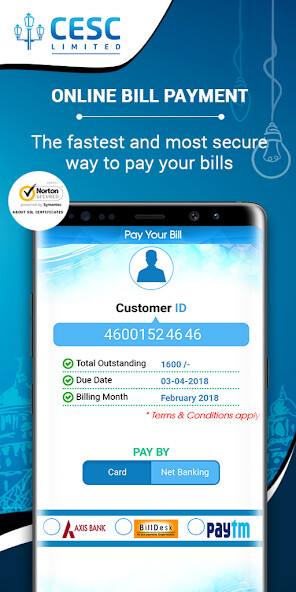
It offers the easiest, fastest and most secure way of paying your CESC bills online.
Pay your CESC Electricity Bills online in just a few taps.
Heres how it works:
1)Click on Quick Links
2)Choose Quick Pay
3)Insert your Customer ID and tap on Submit / You may choose to Scan the QR code mentioned in the hard copy of your bill
4)Your bill details are displayed here.
Please check.
5)Will you be paying by Credit or Debit Card or use Net Banking? Please click on the relevant one.
6)For your benefit, we have provided a few options of Payment Gateway.
Please select your choice of Gateway and click on Pay Now.
7)You will now be redirected to the Payment Gateways secure website, where you can put in your details and pay.
The Payment Gateway might use some additional methods of verification, like OTP for your security.
8)Once your payment is processed, you shall be taken back to the CESCAPP, where the receipt of the payment will be available.
Login and access new personalized Dashboard with Easy One View Access to Your Account.
Heres how it works:
1)Download the CESCAPPS from Google Play Store
2)Enter your Registered Mobile Number
3)We have additional methods of verification, like OTP, for your security.
We take security very seriously
4)After entering the OTP , the number of CESC Accounts attached to the Customer ID will appear
5)You can click on the check box and add the account(s) you want to view regularly
6)Now, provide the ePIN of your choice and Login
7)Please remember the ePIN .This will be required in future to login to the CESCAPPS
More benefits of using CESCAPPS:
Personalized Account Information- New Dashboard with Easy One View Access to Your Accounts
Manage multiple accounts with one app
Register Outages Just tap to auto docket
Keep a Track of your Consumption and Payment
Payment History - Check Bill Details for past 12 months.
Consumption History - Check Consumption Details for past 12 months
Multiple payment options - Pay your monthly bills through Credit card, Debit card, Net banking
View Consumption Trend: A graphical representation of your monthly consumption, for the past 12months is available vis--vis your Previous year consumption
View Payment Trend : A graphical representation of your monthly bill payments, for the past 12months is available
Services : Instantly apply for a service of your choice
Register for E-Bill and get Rs.
5 rebate
Lodge and track status of other Billing and Technical complaints
Report Theft: Anonymously report any theft of power.
Click a picture and send us.
Notifications alerting bill due date, payment confirmation etc.
Got questions? Visit CESC website (www.cesc.co.in ) for more information or write to us at [email protected]
Stay up to date on all our exciting offers and latest happenings by connecting with us online.
Follow us on Twitter - https: //twitter.com/CESCLimited
Like our Facebook page - https: //www.facebook.com/CESCLtd
It offers the easiest, fastest and most secure way of paying your CESC bills online.
Pay your CESC Electricity Bills online in just a few taps.
Heres how it works:
1)Click on Quick Links
2)Choose Quick Pay
3)Insert your Customer ID and tap on Submit / You may choose to Scan the QR code mentioned in the hard copy of your bill
4)Your bill details are displayed here.
Please check.
5)Will you be paying by Credit or Debit Card or use Net Banking? Please click on the relevant one.
6)For your benefit, we have provided a few options of Payment Gateway.
Please select your choice of Gateway and click on Pay Now.
7)You will now be redirected to the Payment Gateways secure website, where you can put in your details and pay.
The Payment Gateway might use some additional methods of verification, like OTP for your security.
8)Once your payment is processed, you shall be taken back to the CESCAPP, where the receipt of the payment will be available.
Login and access new personalized Dashboard with Easy One View Access to Your Account.
Heres how it works:
1)Download the CESCAPPS from Google Play Store
2)Enter your Registered Mobile Number
3)We have additional methods of verification, like OTP, for your security.
We take security very seriously
4)After entering the OTP , the number of CESC Accounts attached to the Customer ID will appear
5)You can click on the check box and add the account(s) you want to view regularly
6)Now, provide the ePIN of your choice and Login
7)Please remember the ePIN .This will be required in future to login to the CESCAPPS
More benefits of using CESCAPPS:
Personalized Account Information- New Dashboard with Easy One View Access to Your Accounts
Manage multiple accounts with one app
Register Outages Just tap to auto docket
Keep a Track of your Consumption and Payment
Payment History - Check Bill Details for past 12 months.
Consumption History - Check Consumption Details for past 12 months
Multiple payment options - Pay your monthly bills through Credit card, Debit card, Net banking
View Consumption Trend: A graphical representation of your monthly consumption, for the past 12months is available vis--vis your Previous year consumption
View Payment Trend : A graphical representation of your monthly bill payments, for the past 12months is available
Services : Instantly apply for a service of your choice
Register for E-Bill and get Rs.
5 rebate
Lodge and track status of other Billing and Technical complaints
Report Theft: Anonymously report any theft of power.
Click a picture and send us.
Notifications alerting bill due date, payment confirmation etc.
Got questions? Visit CESC website (www.cesc.co.in ) for more information or write to us at [email protected]
Stay up to date on all our exciting offers and latest happenings by connecting with us online.
Follow us on Twitter - https: //twitter.com/CESCLimited
Like our Facebook page - https: //www.facebook.com/CESCLtd
MyAndroid is not a downloader online for CESCAPPS - Pay Bill, New Supply, Report Outages. It only allows to test online CESCAPPS - Pay Bill, New Supply, Report Outages with apkid cesc.co.in. MyAndroid provides the official Google Play Store to run CESCAPPS - Pay Bill, New Supply, Report Outages online.
