

We provide EBizCharge Mobile online (apkid: cbs.ebizcharge.mmtbkn.ebizcharge) in order to run this application in our online Android emulator.
Description:
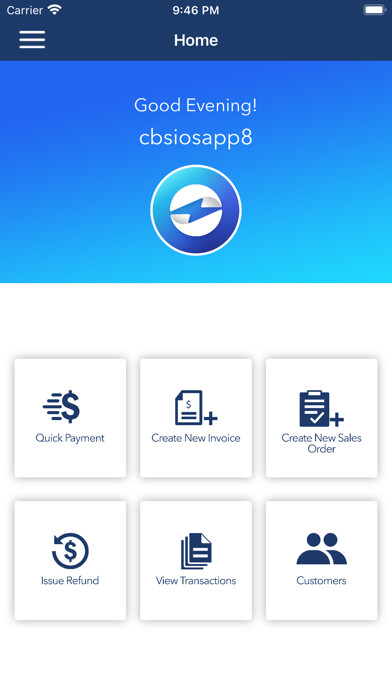
Run this app named EBizCharge Mobile using MyAndroid.
You can do it using our Android online emulator.
EBizCharge Mobile allows you to accept credit, debit, and ACH payments on your phone or mobile device.
Once a transaction is run, it syncs back to your accounting software, so theres no manual reconciling.
Simply run a credit card and move on.
EBizCharge Mobile is built for merchants on the go, whether youre in the field, at a show, or traveling.
Easily create invoices, issue refunds, and manage customer profiles with the peace of mind that all your data is automatically updated in your accounting software in the home office.
EBizCharge Mobile is PCI compliant, you can securely save customer payment information for repeat use.
EBizCharge Mobile is protected by encryption, tokenization, and TLS 1.2, so you can rest easy knowing your customers information is safe.
Key in credit cards or use a physical terminal to accept EMV chip cards
.
EBizCharge Mobile gives your business the power to make sales, run credit cards, and manage transactions on the go.
Features:
Quick Payment
o Scan, manually key in, or use an EMV reader to process payments
o Select a tip amount
o Email or text a receipt to the customer
o Choose to require a customer signature in Settings
Issue Refund
o Quickly issue refunds to customers
Pay Invoice
o View all invoices and filter by status, including past due, open, partially paid, or paid
o Create new invoices with line items, terms, sales reps, and more that sync back to your
o Customers can pay off their invoices with full or partial
o Once paid, invoices are synced back to your ERP
Take Payments on Sales Orders
o Create sales orders on the go that sync back to your ERP
o Run pre-authorizations or accept deposits on sales orders and automatically sync these payments back to your ERP
Inventory
o Sync inventory from your ERP and view/filter your item list with up-to-date quantity on hand in real time
Transactions
o View all transactions and transaction details
o View all transactions within a date range
o View all transactions for a single customer
Customers
o View all customers and customer details
o Create new customers
o Edit customer information
o Call or email customers right from the customer screen
To use EBizCharge Mobile, you must have a merchant account with EBizCharge/Century Business Solutions.
Once a transaction is run, it syncs back to your accounting software, so theres no manual reconciling.
Simply run a credit card and move on.
EBizCharge Mobile is built for merchants on the go, whether youre in the field, at a show, or traveling.
Easily create invoices, issue refunds, and manage customer profiles with the peace of mind that all your data is automatically updated in your accounting software in the home office.
EBizCharge Mobile is PCI compliant, you can securely save customer payment information for repeat use.
EBizCharge Mobile is protected by encryption, tokenization, and TLS 1.2, so you can rest easy knowing your customers information is safe.
Key in credit cards or use a physical terminal to accept EMV chip cards
.
EBizCharge Mobile gives your business the power to make sales, run credit cards, and manage transactions on the go.
Features:
Quick Payment
o Scan, manually key in, or use an EMV reader to process payments
o Select a tip amount
o Email or text a receipt to the customer
o Choose to require a customer signature in Settings
Issue Refund
o Quickly issue refunds to customers
Pay Invoice
o View all invoices and filter by status, including past due, open, partially paid, or paid
o Create new invoices with line items, terms, sales reps, and more that sync back to your
o Customers can pay off their invoices with full or partial
o Once paid, invoices are synced back to your ERP
Take Payments on Sales Orders
o Create sales orders on the go that sync back to your ERP
o Run pre-authorizations or accept deposits on sales orders and automatically sync these payments back to your ERP
Inventory
o Sync inventory from your ERP and view/filter your item list with up-to-date quantity on hand in real time
Transactions
o View all transactions and transaction details
o View all transactions within a date range
o View all transactions for a single customer
Customers
o View all customers and customer details
o Create new customers
o Edit customer information
o Call or email customers right from the customer screen
To use EBizCharge Mobile, you must have a merchant account with EBizCharge/Century Business Solutions.
MyAndroid is not a downloader online for EBizCharge Mobile. It only allows to test online EBizCharge Mobile with apkid cbs.ebizcharge.mmtbkn.ebizcharge. MyAndroid provides the official Google Play Store to run EBizCharge Mobile online.
