
We provide Calculator Locker –Photo Vault online (apkid: calculator.photovault.hidephotos.secretcalculator.secretphotoalbum.photolock.vault) in order to run this application in our online Android emulator.
Description:
Run this app named Calculator Locker âPhoto Vault using MyAndroid.
You can do it using our Android online emulator.
Advantages of Calculator Locker hidden applications:
-Notice bar information tips, only show the standard calculators icon
-Check phone system settings, the application name is Calculator+ (not app hider)
-When Checking recent apps, the app name is Calculator Locker(not app hider)
Calculator Locker can help you to hide any app.
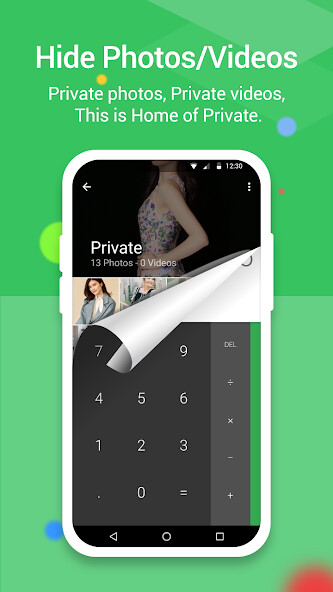
Its secret photo vault, secret calculator vault And keep your privacy by hiding apps.You can open hidden apps in Calculator Locker or interface of your phone.Also Calculator Locker provides hidden picture function, your pictures import into the gallery, others can not see these photos.You can browse protected pictures in hider's gallery.
App Characteristics:
1.Hide all installed photo lock calculator applications (No ROOT Obtaining)
2.Password protection(When the first time,need to create the password)
3.Supports hiding any applications used on mobile phones(Easy way hide apps)
4.Hidden app can be used in the Calculator Locker, also use the main interface in the phone.
5.Open the app just standard calculator , if don't know password can't use the Calculator Locker.
6.Hide Notifications ,provide notification in 3 mode all / just number / none
7.
hidex apps from recents
8.Gallery Module to hide photos /pictures(Protect your secret photos/pictures,avoid others find them)
9.Add shortcut to hiden camera(use the hider's built-in camera to take private photos)
10.Hide Videos and play Videos in calculator vault app
How to use Calculator Locker?
The first time to start or in a protected state, do not need pin can enter the Calculator Locker.Open the application to set the password.
Then you can start using the hidden app.
How to hide photos to Calculator Locker?
Click the app hider interface gallery icon use the Gallery Module, add input folder name to create folder and select pictures or personal photos, then click the save button to import the picture into the created private file.
How to add app to Calculator Locker?
In the hidden display interface click add app button, you can see the phone within the application, select the app to add to the Calculator Locker-App Hider, click the import apps button.
How to delete apps from Calculator Locker?
In the hidden apps interface long press the hidden app, drag the application to the delete icon to delete the hidden application.
How to hide photos or videos to hidder?
Click the app hider interface gallery icon use the Gallery Module, add input folder name to create folder and select pictures or personal photos, then click the save button to import the picture into the created private file.
Notices:
Such as uninstall outside the application has been hidden and the Calculator Locker will not copy the app's original data to the same app in the Calculator Locker.
Android AOSP Calculator source code:
https: //android.googlesource.com/platform/packages/apps/Calculator.git
Apache License, Version 2.0
http: //www.apache.org/licenses/LICENSE-2.0.html
We are currently offering version 1.0.
This is our latest, most optimized version.
It is suitable for many different devices.
Free download directly apk from the Google Play Store or other versions we're hosting.
Moreover, you can download without registration and no login required.
We have more than 2000+ available devices for Samsung, Xiaomi, Huawei, Oppo, Vivo, Motorola, LG, Google, OnePlus, Sony, Tablet .
with so many options, its easy for you to choose games or software that fit your device.
It can come in handy if there are any country restrictions or any restrictions from the side of your device on the Google App Store.
-Notice bar information tips, only show the standard calculators icon
-Check phone system settings, the application name is Calculator+ (not app hider)
-When Checking recent apps, the app name is Calculator Locker(not app hider)
Calculator Locker can help you to hide any app.
Its secret photo vault, secret calculator vault And keep your privacy by hiding apps.You can open hidden apps in Calculator Locker or interface of your phone.Also Calculator Locker provides hidden picture function, your pictures import into the gallery, others can not see these photos.You can browse protected pictures in hider's gallery.
App Characteristics:
1.Hide all installed photo lock calculator applications (No ROOT Obtaining)
2.Password protection(When the first time,need to create the password)
3.Supports hiding any applications used on mobile phones(Easy way hide apps)
4.Hidden app can be used in the Calculator Locker, also use the main interface in the phone.
5.Open the app just standard calculator , if don't know password can't use the Calculator Locker.
6.Hide Notifications ,provide notification in 3 mode all / just number / none
7.
hidex apps from recents
8.Gallery Module to hide photos /pictures(Protect your secret photos/pictures,avoid others find them)
9.Add shortcut to hiden camera(use the hider's built-in camera to take private photos)
10.Hide Videos and play Videos in calculator vault app
How to use Calculator Locker?
The first time to start or in a protected state, do not need pin can enter the Calculator Locker.Open the application to set the password.
Then you can start using the hidden app.
How to hide photos to Calculator Locker?
Click the app hider interface gallery icon use the Gallery Module, add input folder name to create folder and select pictures or personal photos, then click the save button to import the picture into the created private file.
How to add app to Calculator Locker?
In the hidden display interface click add app button, you can see the phone within the application, select the app to add to the Calculator Locker-App Hider, click the import apps button.
How to delete apps from Calculator Locker?
In the hidden apps interface long press the hidden app, drag the application to the delete icon to delete the hidden application.
How to hide photos or videos to hidder?
Click the app hider interface gallery icon use the Gallery Module, add input folder name to create folder and select pictures or personal photos, then click the save button to import the picture into the created private file.
Notices:
Such as uninstall outside the application has been hidden and the Calculator Locker will not copy the app's original data to the same app in the Calculator Locker.
Android AOSP Calculator source code:
https: //android.googlesource.com/platform/packages/apps/Calculator.git
Apache License, Version 2.0
http: //www.apache.org/licenses/LICENSE-2.0.html
We are currently offering version 1.0.
This is our latest, most optimized version.
It is suitable for many different devices.
Free download directly apk from the Google Play Store or other versions we're hosting.
Moreover, you can download without registration and no login required.
We have more than 2000+ available devices for Samsung, Xiaomi, Huawei, Oppo, Vivo, Motorola, LG, Google, OnePlus, Sony, Tablet .
with so many options, its easy for you to choose games or software that fit your device.
It can come in handy if there are any country restrictions or any restrictions from the side of your device on the Google App Store.
MyAndroid is not a downloader online for Calculator Locker –Photo Vault. It only allows to test online Calculator Locker –Photo Vault with apkid calculator.photovault.hidephotos.secretcalculator.secretphotoalbum.photolock.vault. MyAndroid provides the official Google Play Store to run Calculator Locker –Photo Vault online.
