

We provide ApeX Dragon Tribe for WatchMaker online (apkid: baste.wmwatch.apex.dragon.tribe) in order to run this application in our online Android emulator.
Description:
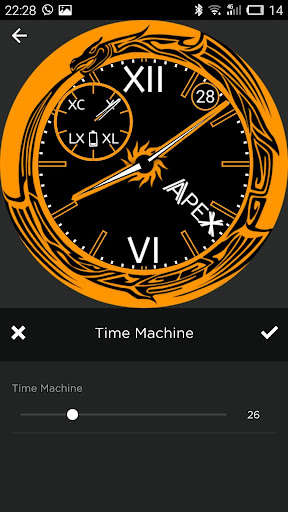
Run this app named ApeX Dragon Tribe for WatchMaker using MyAndroid.
You can do it using our Android online emulator.
Get Style and Precision with ApeX Watch Design.
-----------------------------------------------------
!!! --- >>> You will need to install the WatchMaker Premium v3.4 or higher in order to use this watch face: http: //goo.gl/FMxUfY
-----------------------------------------------------
Features:
- 12h Time
- Analog
- Battery Level
- Charging Status
- Color Switcher
- Date
- Digital
- Tap Actions
Installation:
---------------------------------------
1.
Install on your phone WatchMaker Premium: http: //goo.gl/FMxUfY
2.
Check it works in conjunction with your watch (set to watch any available dial available in WatchMaker Premium)
3.
Install from Google Play this watchface
4.
This watchface will appear on the tab "MY WATCHES" of WatchMaker Premium program
5.
Select this watchface
6.
Set the watchface on your watch, by clicking on the green button "SET WATCHFACE"
7.
Ready!
Enjoy using : )
-----------------------------------------------------
!!! --- >>> You will need to install the WatchMaker Premium v3.4 or higher in order to use this watch face: http: //goo.gl/FMxUfY
-----------------------------------------------------
Features:
- 12h Time
- Analog
- Battery Level
- Charging Status
- Color Switcher
- Date
- Digital
- Tap Actions
Installation:
---------------------------------------
1.
Install on your phone WatchMaker Premium: http: //goo.gl/FMxUfY
2.
Check it works in conjunction with your watch (set to watch any available dial available in WatchMaker Premium)
3.
Install from Google Play this watchface
4.
This watchface will appear on the tab "MY WATCHES" of WatchMaker Premium program
5.
Select this watchface
6.
Set the watchface on your watch, by clicking on the green button "SET WATCHFACE"
7.
Ready!
Enjoy using : )
MyAndroid is not a downloader online for ApeX Dragon Tribe for WatchMaker. It only allows to test online ApeX Dragon Tribe for WatchMaker with apkid baste.wmwatch.apex.dragon.tribe. MyAndroid provides the official Google Play Store to run ApeX Dragon Tribe for WatchMaker online.
