

We provide AutoSnap - Auto Paste Keyboard App online (apkid: autosnap.sender.clipboard.keyboard) in order to run this application in our online Android emulator.
Description:
Run this app named AutoSnap - Auto Paste Keyboard App using MyAndroid.
You can do it using our Android online emulator.
Tired of typing the same text?
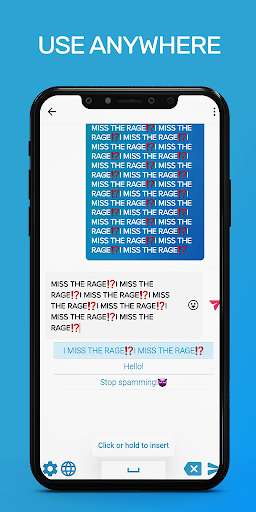
Add frequently used phrases, emails, passwords to AutoSnap Keyboard and quickly insert them by switching to Auto Snap Keyboard using the keyboard switch icon.
AutoSnap is a shortcut keyboard app, it saves your email templates, canned support replies, fast form completion, addresses, phone numbers, email addresses, emoji, or anything you type regularly, and just need one tap when inputting.
Add a standard keyboard
Select your main keyboard in the settings and easily return to it in the future from autosnap keyboard
Text Multiplier Function
If you need to insert duplicate text, do not do it manually, just select in the AutoSnap settings how many times you need to multiply the text.
Auto send function
Just click on the desired phrase and the application will not only insert it, but also send it automatically!
(can be turned on or off at any time)
But this function may not work in all messengers.
How to setup AutoSnap
Open Settings app -> General management -> Language and input -> On-screen keyboard -> Manage keyboard, then enable AutoSnap Keyboard and click OK.
And now you can use Phrases Keyboard in any app.
If you have any questions or wishes, please write to this email [email protected]
Add frequently used phrases, emails, passwords to AutoSnap Keyboard and quickly insert them by switching to Auto Snap Keyboard using the keyboard switch icon.
AutoSnap is a shortcut keyboard app, it saves your email templates, canned support replies, fast form completion, addresses, phone numbers, email addresses, emoji, or anything you type regularly, and just need one tap when inputting.
Add a standard keyboard
Select your main keyboard in the settings and easily return to it in the future from autosnap keyboard
Text Multiplier Function
If you need to insert duplicate text, do not do it manually, just select in the AutoSnap settings how many times you need to multiply the text.
Auto send function
Just click on the desired phrase and the application will not only insert it, but also send it automatically!
(can be turned on or off at any time)
But this function may not work in all messengers.
How to setup AutoSnap
Open Settings app -> General management -> Language and input -> On-screen keyboard -> Manage keyboard, then enable AutoSnap Keyboard and click OK.
And now you can use Phrases Keyboard in any app.
If you have any questions or wishes, please write to this email [email protected]
MyAndroid is not a downloader online for AutoSnap - Auto Paste Keyboard App. It only allows to test online AutoSnap - Auto Paste Keyboard App with apkid autosnap.sender.clipboard.keyboard. MyAndroid provides the official Google Play Store to run AutoSnap - Auto Paste Keyboard App online.
