

We provide RICOH IWB Client online (apkid: apple.jp.co.ricoh.iwbclient) in order to run this application in our online Android emulator.
Description:
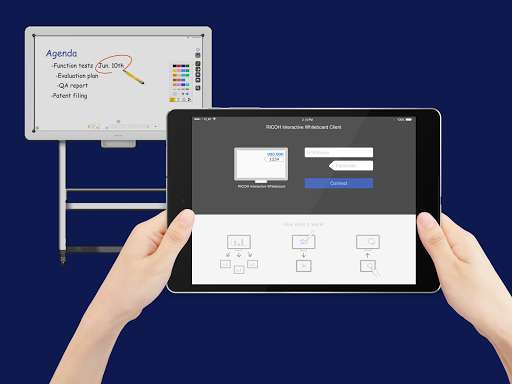
iPhone app RICOH IWB Client download it using MyAndroid.
RICOH Interactive Whiteboard Client can enforce your discussion more interactively by connecting your device to RICOH Interactive Whiteboard via local network.
To use RICOH Interactive Whiteboard Client, RICOH Interactive Whiteboard (http: //www.ricoh.co.jp/iwb/) and the license for remote whiteboard function are required.
Features available
View screen of RICOH Interactive Whiteboard
Draw strokes on the screen of RICOH Interactive Whiteboard
Draw markers on RICOH Interactive Whiteboard (drawn marker automatically disappears in a few seconds after it is drawn)
Delete strokes on RICOH Interactive Whiteboard
Add new pages on RICOH Interactive Whiteboard
Turn pages of RICOH Interactive Whiteboard
Switch external inputs of RICOH Interactive Whiteboard
Upload image file to RICOH interactive whiteboard
How to use
1.
Start a RICOH Interactive Whiteboard, and start a Remote Whiteboard session
2.
Run the RICOH Interactive Whiteboard Client
3.
Input IP Address or host name of the RICOH Interactive Whiteboard and the passcode displayed on the RICOH Interactive Whiteboard
Supported OS
Please refer to the list of supported OS from the linked Notes for Users.
http: //support.ricoh.com/bb_v1oi/html/oi/r/model/op10/op10en.htm
Connectable RICOH Interactive Whiteboard
D5510 (firmware version 1.6 and later)
D2200
RICOH Interactive Whiteboard Controller Type 1
RICOH Interactive Whiteboard Controller Type 2
RICOH Collaboration Board Controller Type 3
RICOH Interactive Whiteboard Controller OP-5/OP-10 (with RICOH Interactive Whiteboard Lt for Open Controller),
MyAndroid is not a downloader online for RICOH IWB Client. It only allows to test online RICOH IWB Client with apkid apple.jp.co.ricoh.iwbclient. MyAndroid provides the official Google Play Store to run RICOH IWB Client online.
