
We provide PeterJohn V4 PlayGrounds online (apkid: apple.com.yassun.peterjohn) in order to run this application in our online Android emulator.
Description:
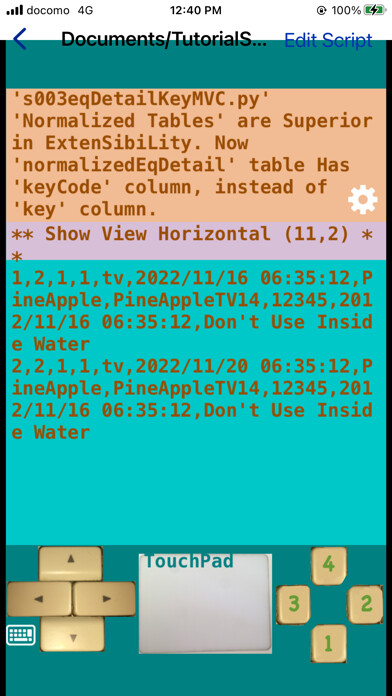
iPhone app PeterJohn V4 PlayGrounds download it using MyAndroid.
****What is this;;
PeterJohn is a Python3 PlayGrounds runs on iPhone.
This enables you to code, run and learn Python3 even on the train, on the bus, even Offline.
****Why we named PeterJohn;;
Peter is the son of Old John.
Young John is the son of Zebedee.
Peter and Young John led Christianity in the early church.
We named PeterJohn after the two names of Peter and Young John.
** Why we made this and Why we chose Python3;;
We wanted to code even on the train or even on the bus,
even on OffLine.
and wanted to offer you to do the same things.
We chose Python3 as the programing language.
cause the Curly Bracket language such
as JavaScript needs many lines and
its Not appropriate in the narrow iPhone screen.
**Basic Technology;;
PeterJohn is constructed on some of basic technologies.
**Python-Apple-Support;;
We didnt want to make any Wheel language and
any Wheel interpreter.
so we chose Python3 and
we used Python-Apple-Support as the Python3 interpreter.
Python-Apple-Support is one of CPython.
**CPythons Extension Function;;
This is used for Python to call Swift function
such as GUI
via Objective-C and
for Swift to call Python via Objective-C
in order to offer Python3 interpreter.
**PeterJohn-Bridging-Header.h;;
This is used to import Objective-C header files to Swift.
This enables Swift to use CPythons Extension Function via Objective-C.
**PeterJohn-Swift.h;;
This enables CPythons Extension Function to use Swift such as GUI via Objective-C.
**AudioKit;;
To implement playing MIDI function, we used AudioKit.
**squash.py;;
Many people on this planet have learned the programing
from the squash.py.
****What we offer you;;
**s00stdErrTest.py;;
iOS hides stderr to make simple to use iPhone.
but its required when we learn Python3.
so I wrote logStdErr.py.
Import logStdErr and
execute logStdErr.errToFile()
in your code.
**s01basicUi.py;;
pj.title()
pj.removeAllFromCanvas()
pj.createRectangle()
pj.createCircle()
pj.createLabel()
pj.setText()
pj.updateMainPanel()
**s02midiTest.py;;
pj.midi();
**s03bindTest.py;;
pj.bindMotionFunction()
pj.bindMotionCanvasFunction()
pj.bindButtonFunction()
pj.bindKeyPressFunction()
For example,
pj.bindButtonFunction(p1: s03bindTest.click)
By the notation of p1: s03bindTest.click,
the function click is executed
only from the script file s03bindTest in the project p1.
**s04timerTest.py;;
pj.startTimerFunctionAfter()
pj.stopTimer()
For example,
pj.startTimerFunctionAfter(p1: s04timerTest.gameLoop)
By the notation of p1: s04timerTest.gameLoop,
the function gameLoop is executed
only from the script file s04timerTest in the project p1.
**s05squash.py;;
This is the PeterJohn implementation
of the Famous squash.py.
**s06spriteBundle.py;;
pj.createSpriteBundle()
Thiss just a demonstration,
you need to proceed to create Sprite from SandBox
cause the Bundle file is freezed when we submitted
this app to AppStore and
you can Not change the Bundle file.
**s07audioBundle.py;;
pj.playSoundEffectsBundle()
pj.prepareBgmBundle()
pj.playBGM()
Thiss just a demonstration,
you need to proceed to create Audio from SandBox
cause the Bundle file is freezed when we submitted
this app to AppStore and
you can Not change the Bundle file.
**s08spriteSandBox.py;;
pj.createSpriteSandBox()
You can import your PNG files to your project.
**s09audioSandBox.py;;
pj.playSoundEffectsSandBox()
pj.prepareBgmSandBox()
pj.playBGM()
You can import your MP3 files to your project.
**Acknowledgements;;
Thank you Lord, Thank you King Jesus.
Thank you AppStore Review Team, every day.
Thank you Guido van Rossum, the author of CPython.
Thank you Russell Keith-Magee, the author of Python-Apple-Support.
Thank you Aurelius Prochazka, the author of AudioKit.
Thank you M-Sugaya, the author of squash.py.
Best Regards,
--Yasushi Yassun Obata,
MyAndroid is not a downloader online for PeterJohn V4 PlayGrounds. It only allows to test online PeterJohn V4 PlayGrounds with apkid apple.com.yassun.peterjohn. MyAndroid provides the official Google Play Store to run PeterJohn V4 PlayGrounds online.
