

We provide SiOutlook Evo online (apkid: apple.com.k4ict.sioutlookevo) in order to run this application in our online Android emulator.
Description:
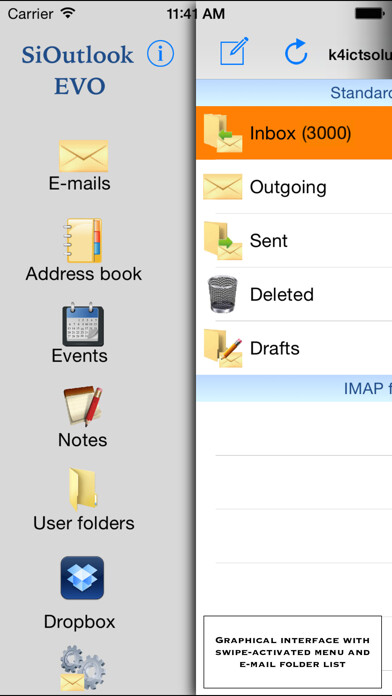
iPhone app SiOutlook Evo download it using MyAndroid.
SiOutlook Evo is an evolution of SiOutlook that permits to manage the user e-mails for iPhone/iPad.
SiOutlook Evo has the same base structure of SiOutlook with a lot of enhancements and functions, a simpler graphical user interface and a flexible main menu that brings up with a swipe.
Charles Darwin will be the promotor of SiOutlook Evo in order to run after in its extravagant and evolutionary functions.
- it permits to manage several account types, and wherever a particular e-mail provider must be used, you only need to know IMAP, POP3 and SMTP settings in order to send and receive e-mails;
- it permits to store big e-mail quantities in a persistent local storage, so that to avoid the use of continuous connection; SiOutlook Evo permits to download e-mails even in background mode too;
- it permits to select a specific account; in this way, SiOutlook Evo will show only e-mails and IMAP folders relevant to that account;
- it permits to synchronize IMAP folders; this means that, if you modify an IMAP folder content inside SiOutlook Evo, the same will apply on your e-mail server too;
- it permits to manage rules, that is, you can decide if SiOutlook Evo must store the downloaded e-mails in a specific folder created by the user; this permits to the user to avoid to manually move the e-mails in a folder after the download;
- it permits to manage meetings in the calendar; the organizer can involve one or more users so that to make a conversation with them and reach an agreement;
- it integrates with Dropbox; the user can access to his Dropbox repository with his username and password, so that to download and upload files such as any other Dropbox client application;
- it permits to posticity/program e-mails; the user can decide, with a programmable timer, when the user has to be notified;
- when sending a new e-mail, you can decide if to apply ciphering (make text secure on server side and let SiOutlook Evo decipher while downloading), mark is as high priority e-mail and request the e-mail has been read notification;
- it permits to notify birthdays, with SMS or e-mails;
- it permits to create both text and hand-written notes, that can be converted in PDF and sent by e-mail;
- it permits to insert audio and Video recordings inside e-mail, and take photo too;
- it permits to create user folders and store e-mails, documents, audio and Video files, etc.;
- it permits to access to Gmail, Yahoo and Facebook contact list and, in this last case, birthday notifications will be notified as messages;
- it permits to import and export contact lists stored as CSV files and store them inside the address book;
- it permits to quickly search e-mails and any other document with an integrated search box;
- it permits to reduce pictures size before to send them by e-mail and decide the final resolution;
- it doesnt support push notifications actually;
- it permits to import audio, Video and image files from iTunes and camera roll;
- it permits to set up a startup password
- and more
All easy, all in one solution, simple, flexible, fast and handy.
Test it and believe!,
MyAndroid is not a downloader online for SiOutlook Evo. It only allows to test online SiOutlook Evo with apkid apple.com.k4ict.sioutlookevo. MyAndroid provides the official Google Play Store to run SiOutlook Evo online.
