
We provide Lanchester Augmented Reality online (apkid: apple.com.aisolve.hlflanar) in order to run this application in our online Android emulator.
Description:
iPhone app Lanchester Augmented Reality download it using MyAndroid.
Let Frederick Lanchesters inventions and achievements spring to life with Augmented Reality.
Download the app and the AR triggers to view how the collection comes alive.
There are 12 unique AR pieces for you to try.
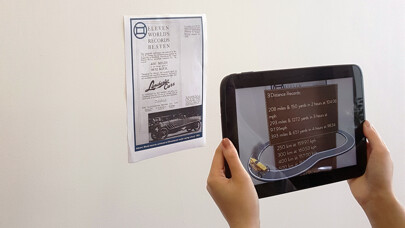
AR works by showing your devices camera to a specific picture, and then virtual content springs out to bring it to life!
Step 1 Download the AR app and install on your device
Step 2 Pick some of the AR images available at http: //www.lanchesterinteractive.org/fun-games/ in the AR Download section.
Download the images and bring them up full size on a screen (e.g.
laptop or desktop monitor), or print them out on A4 paper
Step 3 Start up the app, after it finishes loading you should see a camera feed on your device
Step 4 Point your devices camera at the image youve got on your screen or print-out.
Try to make sure the image is fairly close, flat and parallel to the camera to get the best view.
Step 5 See the AR content come to life!,
MyAndroid is not a downloader online for Lanchester Augmented Reality. It only allows to test online Lanchester Augmented Reality with apkid apple.com.aisolve.hlflanar. MyAndroid provides the official Google Play Store to run Lanchester Augmented Reality online.
