
We provide BT Robot Controller online (apkid: appinventor.ai.samakbrothers.drivebot.controller) in order to run this application in our online Android emulator.
Description:
Run this app named BT Robot Controller using MyAndroid.
You can do it using our Android online emulator.
BT Robot Controller uses UART serial communication protocol to transmit data wirelessly to your robotic rover over a bluetooth connection.
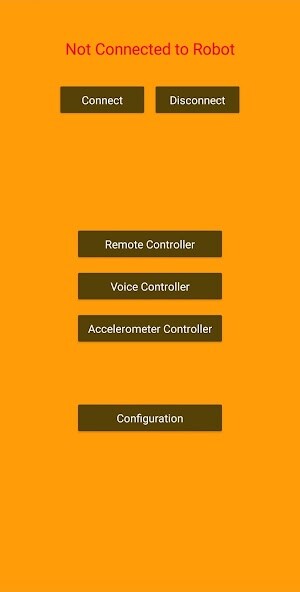
The app features 3 modes:
1.
Remote Controller
The Remote Controller has 5 buttons respectively for Forward, Backward, Left, Right and Stop.
When a button is pressed, the app transmits a specific character corresponding to that button using bluetooth serial (UART) communication protocol.
2.
Voice Controller
The Voice Controller has a "Command" button.
It understands 5 commands, viz.
Forward, Backward, Left, Right and Stop.
When a command is recognized, the app transmits a specific character corresponding to that command using bluetooth serial (UART) communication protocol.
3.
Accelerometer Controller
The Accelerometer Controller senses the orientation of your device and accordingly drives the robotic rover Forward, Backward, Left, Right or Stops it.
Depending upon your device's orientation, the app transmits a specific character using bluetooth serial (UART) communication protocol.
The default characters to be sent to the robot representing each function are as follows:
w: Forward
s: Backward
a: Left
d: Right
x: Stop
Users can also set custom characters from the "Configuration" menu.
However, note that once the app restarts, the defaults will be restored.
FEATURES:
1.
Tested using HC-05 Bluetooth Module and Arduino UNO.
2.
Three controllers in a single app - Remote Controller, Voice Controller, Accelerometer Controller.
3.
"Configuration" menu for transmitting custom characters to the robot.
4.
"Connect" and "Disconnect" buttons to quickly switch between connections without closing the app.
5.
Multi-page systematic user interface for convenient usage.
6.
Completely FREE! No Ads!
Watch the demonstration of DriveBot (a robotic rover) being controlled by the BT Robot Controller app here:
1.
Remote Controller: https: //www.youtube.com/watch?v=ZbOzBzbi3hI
2.
Voice Controller: https: //www.youtube.com/watch?v=n39QnHCu9Xo
3.
Accelerometer Controller: https: //www.youtube.com/watch?v=KEnkVOnX4cw
Think these features are limited?
You can use another Android App developed by us to send and receive custom commands over Bluetooth.
Its called "BT Terminal" and is available at: https: //play.google.com/store/apps/details?id=appinventor.ai_samakbrothers.BT_Terminal
The app features 3 modes:
1.
Remote Controller
The Remote Controller has 5 buttons respectively for Forward, Backward, Left, Right and Stop.
When a button is pressed, the app transmits a specific character corresponding to that button using bluetooth serial (UART) communication protocol.
2.
Voice Controller
The Voice Controller has a "Command" button.
It understands 5 commands, viz.
Forward, Backward, Left, Right and Stop.
When a command is recognized, the app transmits a specific character corresponding to that command using bluetooth serial (UART) communication protocol.
3.
Accelerometer Controller
The Accelerometer Controller senses the orientation of your device and accordingly drives the robotic rover Forward, Backward, Left, Right or Stops it.
Depending upon your device's orientation, the app transmits a specific character using bluetooth serial (UART) communication protocol.
The default characters to be sent to the robot representing each function are as follows:
w: Forward
s: Backward
a: Left
d: Right
x: Stop
Users can also set custom characters from the "Configuration" menu.
However, note that once the app restarts, the defaults will be restored.
FEATURES:
1.
Tested using HC-05 Bluetooth Module and Arduino UNO.
2.
Three controllers in a single app - Remote Controller, Voice Controller, Accelerometer Controller.
3.
"Configuration" menu for transmitting custom characters to the robot.
4.
"Connect" and "Disconnect" buttons to quickly switch between connections without closing the app.
5.
Multi-page systematic user interface for convenient usage.
6.
Completely FREE! No Ads!
Watch the demonstration of DriveBot (a robotic rover) being controlled by the BT Robot Controller app here:
1.
Remote Controller: https: //www.youtube.com/watch?v=ZbOzBzbi3hI
2.
Voice Controller: https: //www.youtube.com/watch?v=n39QnHCu9Xo
3.
Accelerometer Controller: https: //www.youtube.com/watch?v=KEnkVOnX4cw
Think these features are limited?
You can use another Android App developed by us to send and receive custom commands over Bluetooth.
Its called "BT Terminal" and is available at: https: //play.google.com/store/apps/details?id=appinventor.ai_samakbrothers.BT_Terminal
MyAndroid is not a downloader online for BT Robot Controller. It only allows to test online BT Robot Controller with apkid appinventor.ai.samakbrothers.drivebot.controller. MyAndroid provides the official Google Play Store to run BT Robot Controller online.
