
We provide UART-LE online (apkid: uart.le) in order to run this application in our online Android emulator.
Description:
Download this app named UART-LE.
This app is written to communicate using both the Cypress BLE-UART solutions and the Nordic UART 2.0.Cypress Requirements:
Hardware: This chat is written for this development kit:
http: //www.cypress.com/documentation/development-kitsboards/cy8ckit-042-ble-bluetooth-low-energy-ble-pioneer-kit
Firmware: Your hardware must be running this firmware compiled for your chosen module (PSOC or PROC)
- https: //github.com/cypresssemiconductorco/PSoC-4-BLE/tree/master/100_Projects_in_100_Days/Day020_BLE_UART
- Use PSOC creator and compile and program the firmware to your dev board.
Nordic Requirements:
Hardware: nRF52 DK
Firmeware: Compile and Download the "ble_peripheral" project from the Nordic nRF5 SDK.
You will need to download the Soft Devices to flash memory using the nRF Go Studio tool as well.
How to use:
2.
Open a com terminal (such as Termite or Teraterm) on your computer.
Make sure are connected to the USB com port on your BLE pioneer kit (hint: Windows users should look at device manager).
3.
Open the BLE chat app, scan for your kit's ble.
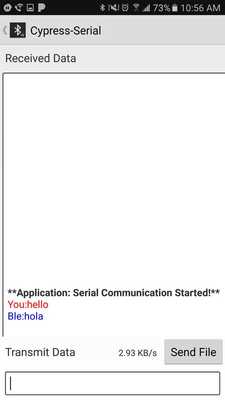
Press on the the name of your kit, a chat window will open to send text to the computer terminal and to receive text from the computer terminal.
Updates:
- UI fixes, swipe to search- Send File function with transmit speed
Free download Android UART-LE from MyAndroid.net
MyAndroid is not a downloader online for UART-LE. It only allows to test online UART-LE with apkid uart.le. MyAndroid provides the official Google Play Store to run UART-LE online.
