

We provide Parental Control App online (apkid: parentalcontrol.parent) in order to run this application in our online Android emulator.
Description:
Run this app named Parental Control App using MyAndroid.
You can do it using our Android online emulator.
Parental Control App makes parenting easier with daily screen time limits, app monitoring, including app blocking, kid tracking, family mode, porn blocking and more.
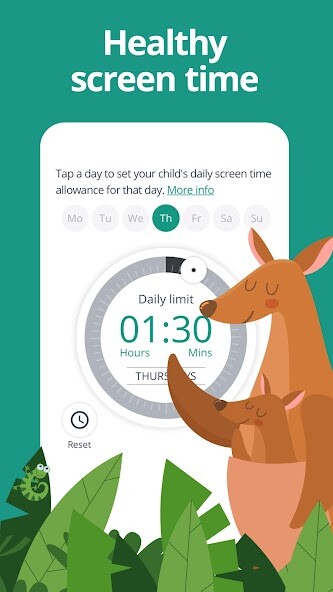
- Screen time blocker: Automatically blocks the device once the set time is reached
- Family Parental Control & Family mode: Tracks and controls what your kid accesses on the internet including delicate content and an adult content filter
- Family locator GPS tracker: Tracks your kid's phone and sends you the GPS location
Start by downloading the Parental Control App onto your device.
Then download the Parental Control Kids App companion app onto your kids devices.
Together, these apps allow you to seamlessly manage your kids daily screen time allowance on all linked mobile and tablet devices across Android and iOS.
Parental Control Free app (1 supervised device)
Set and manage daily screen time limits with screen time blocker
Block websites or categories (games, gambling, porn)
Website search and app monitoring
Safe search to block adult or porn sites
Unsupported browser blocking
Advanced reporting (7-day history)
Alerts for Family locator mode, GPS tracker, screen time blocker
Parental Control Premium App (5, 10 or 15 supervised devices)
Enjoy everything you get in the free Parental Control App, plus:
YouTube monitoring
Family locator geolocation tracker
App blocker (block by app, not just category)
30-day screen time history reporting
Priority Parental Control support
Priority access to new features
Link more devices for full family mode & family locator
Install to monitor screen time on any other iOS or Android device
How to protect, block & monitor screen time with Parental Control App:
1 First download Parental Control App onto your device (usually your mobile phone) and create an account or log in
2 Then install the Parental Control Kids App on the kid device you want to supervise
3 Log in and follow the quick setup instructions
4 Once done, inappropriate websites will be blocked automatically
5 To monitor activity and screen time, use this Parental Control App on a parent device
Our FAQ:
Does Parental Control App work on other platforms besides Android? Parental Control can protect iOS and Android mobile devices.
What languages do you support? Parental Control is available in English, Spanish, French, Italian, Portuguese, German, Japanese and Chinese.
For support, contact us here: https: //www.parentalcontrol.app/support and [email protected]
Notes:
This app uses the Device Administrator permission.
This will prevent a user from uninstalling Parental Control Kids App without your knowledge.
This app uses Accessibility services to build an excellent device experience that helps users with behavioral disabilities set appropriate levels of access and monitor screen time, web content and apps, in order to limit risks and enjoy life.
Troubleshooting notes:
Huawei devices owners: Battery-saving mode needs to be disabled for Parental Control Kids App.
- Screen time blocker: Automatically blocks the device once the set time is reached
- Family Parental Control & Family mode: Tracks and controls what your kid accesses on the internet including delicate content and an adult content filter
- Family locator GPS tracker: Tracks your kid's phone and sends you the GPS location
Start by downloading the Parental Control App onto your device.
Then download the Parental Control Kids App companion app onto your kids devices.
Together, these apps allow you to seamlessly manage your kids daily screen time allowance on all linked mobile and tablet devices across Android and iOS.
Parental Control Free app (1 supervised device)
Set and manage daily screen time limits with screen time blocker
Block websites or categories (games, gambling, porn)
Website search and app monitoring
Safe search to block adult or porn sites
Unsupported browser blocking
Advanced reporting (7-day history)
Alerts for Family locator mode, GPS tracker, screen time blocker
Parental Control Premium App (5, 10 or 15 supervised devices)
Enjoy everything you get in the free Parental Control App, plus:
YouTube monitoring
Family locator geolocation tracker
App blocker (block by app, not just category)
30-day screen time history reporting
Priority Parental Control support
Priority access to new features
Link more devices for full family mode & family locator
Install to monitor screen time on any other iOS or Android device
How to protect, block & monitor screen time with Parental Control App:
1 First download Parental Control App onto your device (usually your mobile phone) and create an account or log in
2 Then install the Parental Control Kids App on the kid device you want to supervise
3 Log in and follow the quick setup instructions
4 Once done, inappropriate websites will be blocked automatically
5 To monitor activity and screen time, use this Parental Control App on a parent device
Our FAQ:
Does Parental Control App work on other platforms besides Android? Parental Control can protect iOS and Android mobile devices.
What languages do you support? Parental Control is available in English, Spanish, French, Italian, Portuguese, German, Japanese and Chinese.
For support, contact us here: https: //www.parentalcontrol.app/support and [email protected]
Notes:
This app uses the Device Administrator permission.
This will prevent a user from uninstalling Parental Control Kids App without your knowledge.
This app uses Accessibility services to build an excellent device experience that helps users with behavioral disabilities set appropriate levels of access and monitor screen time, web content and apps, in order to limit risks and enjoy life.
Troubleshooting notes:
Huawei devices owners: Battery-saving mode needs to be disabled for Parental Control Kids App.
MyAndroid is not a downloader online for Parental Control App. It only allows to test online Parental Control App with apkid parentalcontrol.parent. MyAndroid provides the official Google Play Store to run Parental Control App online.
