
We provide Organizer Widget online (apkid: organizer.widget) in order to run this application in our online Android emulator.
Description:
Download this app named Organizer Widget.
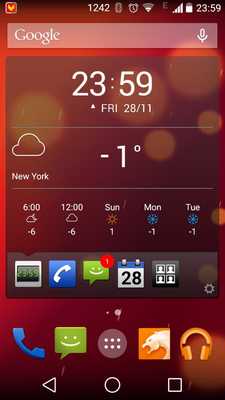
Organizer widget is a hub to display different information: last and unanswered calls, new SMS, Facebook messages, Tweets, tasks and events, e-mails, etc.How to install the widget:
1.
Go to home screen
2.
Click on Application icon
3.
Choose Widgets submenu
4.
Choose Organizer Widget
When install you have option to choose information items to display and color scheme.
List of information supported by Organizer Widget:
- Clock & Weather Forecast Open Weather and Yahoo Weather(*) supported
- Phone Calls
- SMS
- Calendar
- Google E-Mail
- E-Mail (*) (including MS Exchange)
- Google tasks
- Birthday calendar (*)
- Evernote
- VKontakte
- Telegram
Explanation per permissions:
-- android.permission.READ_CALENDAR â we need it for Calendar
-- android.permission.RECEIVE_BOOT_COMPLETED â to run services after the reboot
-- android.permission.INTERNET â that is for advertising that displayed in âfreeâ mode
-- android.permission.ACCESS_NETWORK_STATE â that is for advertising that displayed in âfreeâ mode
-- android.permission.GET_TASKS â we disable services when other application is used by user â in this way we save battery usage dramatically.
-- com.android.vending.BILLING â that is for in-app purchase we have in application.
(*) - available in Extra Pack.
Updates:
- fix gmail plugin- fix google task plugin
- fix many small bugs
Free download Android Organizer Widget from MyAndroid.net
MyAndroid is not a downloader online for Organizer Widget. It only allows to test online Organizer Widget with apkid organizer.widget. MyAndroid provides the official Google Play Store to run Organizer Widget online.
