

We provide My bucket list online (apkid: my.bucket.list) in order to run this application in our online Android emulator.
Description:
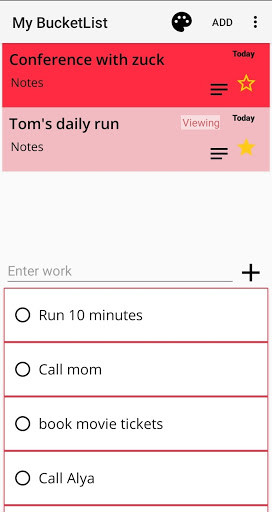
Download this app named My bucket list.
You can enter the title, the importance, and the details.You can see both the ongoing bucket list and the completed bucket list.
Rank according to importance.
You can decorate your bucket list with a sticker.
You can see a list of buckets in the status bar for a long time in your head.
* How to store data.
Click the Save button in Settings.
This will create a file called "MyBucketList.db" in the smartphone's internal storage.
Keep this file elsewhere.
* How to load data.
Copy the file "MyBucketList.db" to your smartphone's internal storage on your smartphone.
Then click the Import button in the application's settings.
In the executed file explorer, select the copied "MyBucketList.db" file.
Confirm the import success message.
Updates:
Added the ability to back up and restore bucket list data.
Free download Android My bucket list from MyAndroid.net
MyAndroid is not a downloader online for My bucket list. It only allows to test online My bucket list with apkid my.bucket.list. MyAndroid provides the official Google Play Store to run My bucket list online.
