

We provide Marutaro Keyboard online (apkid: marutaro.keyboard) in order to run this application in our online Android emulator.
Description:
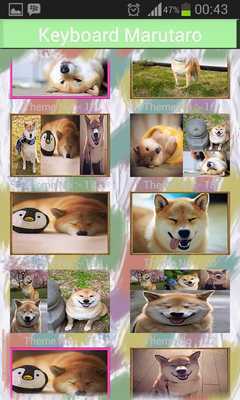
Download this app named Marutaro Keyboard.
Marutaro is a dog that becomes internet celebrity today.Marutaro is a Japanese dog with the kind of Shiba-Inu who was five years old but already has a lot pemikut in social media.
marutaro now available on your keyboard.
install it now .
How to use?
- Open the application after finally installed
- Select "Enable Keyboard" and select "Keyboard Icon"
- Select "Set Input Method" and select "Keyboard Icon"
- Select "Set Theme" and then choose the theme of the keyboard is available
- Done.
* You can choose to include your photo to be used as the theme
- Select the "Themes Background"
- Select "Set Background Gallery" select an existing photo in your gallery.
- Set the size of the photo to be used as the theme of the keyboard
- Select "Set Theme" which is under the menu "Set Background Gallery"
- Done.
Enjoy it
Updates:
Free download Android Marutaro Keyboard from MyAndroid.net
MyAndroid is not a downloader online for Marutaro Keyboard. It only allows to test online Marutaro Keyboard with apkid marutaro.keyboard. MyAndroid provides the official Google Play Store to run Marutaro Keyboard online.
