

We provide Jota+ Cubby Connector online (apkid: jota.cubby.connector) in order to run this application in our online Android emulator.
Description:
Download this app named Jota+ Cubby Connector.
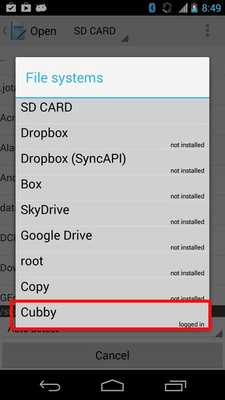
Jota+ Cubby Connector is a plugin to connect Jota+ with Cubby (www.cubby.com)(Cubby is a cloud storage of LogMeIn.)
Install this plugin then you can activate the connectivity to Cubby.
----------------------------
This app needs Jota+ and Jota+â PRO-KEY.
----------------------------
How to use connector.
- Touch 'Open' on the toolbar then file browser will open.
- Click Jota+ icon on the top-left corner then click "Settings-Storage".
- Select one which you want and install a connector.
- Log in to the connector.
- Again open the drawer.
- Click the name of the connector.
- Browse directory on the file system.
- Open a file.
No need to use Cubby's official apps.
Updates:
[2014/05/05]Updated interface.
Free download Android Jota+ Cubby Connector from MyAndroid.net
MyAndroid is not a downloader online for Jota+ Cubby Connector. It only allows to test online Jota+ Cubby Connector with apkid jota.cubby.connector. MyAndroid provides the official Google Play Store to run Jota+ Cubby Connector online.
