
We provide Fancy Locker -World Time Theme online (apkid: fancy.locker.world.time.theme) in order to run this application in our online Android emulator.
Description:
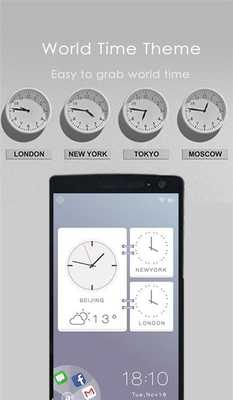
Download this app named Fancy Locker -World Time Theme.
Lancy Locker - World Time ThemeThis is a new FREE and Practical theme for Fancy Locker!
Brief Introduction:
★ Small, easy to read and highly customizable, Simple World Time locker.
★ Custom Time zone : A compact clock locker, displaying the 3 time zone in your desirable locations.
★ App shortcuts: Put the most used apps on the lock screen, so you can launch them faster.
(NEW FEATURE!)
★ Notification: Quick and Fluency access to new notifications,never miss important messages.
Notice
★ World Time Theme is only available for phones with Fancy Locker installed.
How to apply the Theme:
1.
Directly open the theme after successful install Fancy Locker.
2.
Tap "Apply" to beautify your home screen.
3.
Or go to Fancy Locker -> Themes -> choose World Time Theme -> Apply
Updates:
1.Optimized operation.
2.
Modified some display problems.
Free download Android Fancy Locker -World Time Theme from MyAndroid.net
MyAndroid is not a downloader online for Fancy Locker -World Time Theme. It only allows to test online Fancy Locker -World Time Theme with apkid fancy.locker.world.time.theme. MyAndroid provides the official Google Play Store to run Fancy Locker -World Time Theme online.
