

We provide Encrypt Tool online (apkid: encrypt.tool) in order to run this application in our online Android emulator.
Description:
Download this app named Encrypt Tool.
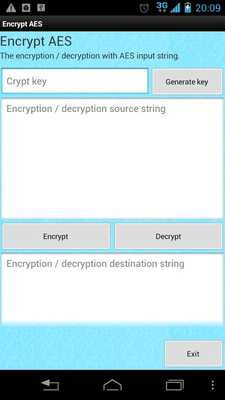
The encrypted using the encryption method of AES character string input.In part it is displayed as "Crypt key" in the initial display
I will enter the encryption / decryption key.
Key is 16 characters alphanumeric.
The location listed as "Encryption / decryption source string" in the initial display
Please enter the string encryption / decryption target.
Click the "Decrypt" button when you want to decrypt, the "Encrypt" button when you want to encrypt.
âârelease note(web page)ââ
http: //corpore.garyoutensei.com/androidMarket/releasenote/encryptaes.html
When you click the button above, to the part that says "dest text" in the initial display
Results are output.
Updates:
2013/05/05 v1.2 releaseI changed the hint text that was initially displayed.
I was fixed text to be initially displayed.
I added key generation function (automatic create a key when you click the "Generate key" button).
Free download Android Encrypt Tool from MyAndroid.net
MyAndroid is not a downloader online for Encrypt Tool. It only allows to test online Encrypt Tool with apkid encrypt.tool. MyAndroid provides the official Google Play Store to run Encrypt Tool online.
