

We provide Easy Battery Saver online (apkid: easy.battery.saver) in order to run this application in our online Android emulator.
Description:
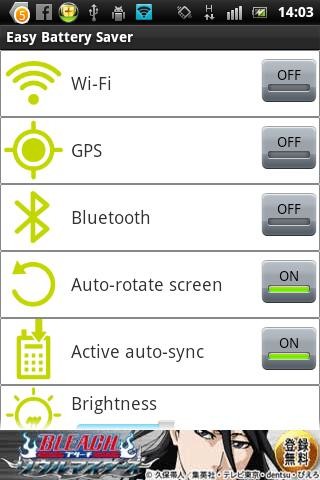
Download this app named Easy Battery Saver.
When your cell phone contains the limited power, you can click "OFF" mode to activate the power saving mode.When you press the OFF button, the following hardware like Wifi, Bluetooth, Brightness, Sound, Mobile Data & Synchronization will become inactive.
and while you press that button back then power saving mode become inactive and your hardware will become active.
This tools contain extra features like you can customize the hardware settings by your way.
suppose if you don't want to inactivate your Wifi status during power saving mode then you can just do it by setting screens.
and also you can do it for all other hardwares.
If you want to perform this task by automatically then you can also do it.
in that just set battery percentage on specific value.
so when your battery percentage will be at your define value, the all hardware should be go in inactive mode.
If you like the tools, please rate 5★ if you like it.
Your questions and comments are welcomed to our feedback email at [email protected].
Tags : Battery Saver, Power Saver
Updates:
Free download Android Easy Battery Saver from MyAndroid.net
MyAndroid is not a downloader online for Easy Battery Saver. It only allows to test online Easy Battery Saver with apkid easy.battery.saver. MyAndroid provides the official Google Play Store to run Easy Battery Saver online.
